What is Zoho Books Accounting Software? While 67% of small businesses have now moved their accounting to the cloud, many are still trapped in decision paralysis between the usual suspects. Enter Zoho Books, a solution that has been steadily gaining traction as the established players in the accounting software market hike prices.
So what is Zoho Books accounting software? It is a cloud-based accounting platform that helps businesses track and manage their finances, automate workflows and ensure compliance without charging exorbitant user fees.
It is much more than simple QuickBooks alternatives and targets companies that need advanced accounting features but not an enterprise-level price. I’ll define what Zoho Books is, the benefits, pricing and how to get started in this no-fluff breakdown. If you’re shelling out a fortune yearly for accounting software or still lost in spreadsheet chaos, this is your wake-up call.
Understanding What is Zoho Books Accounting Software
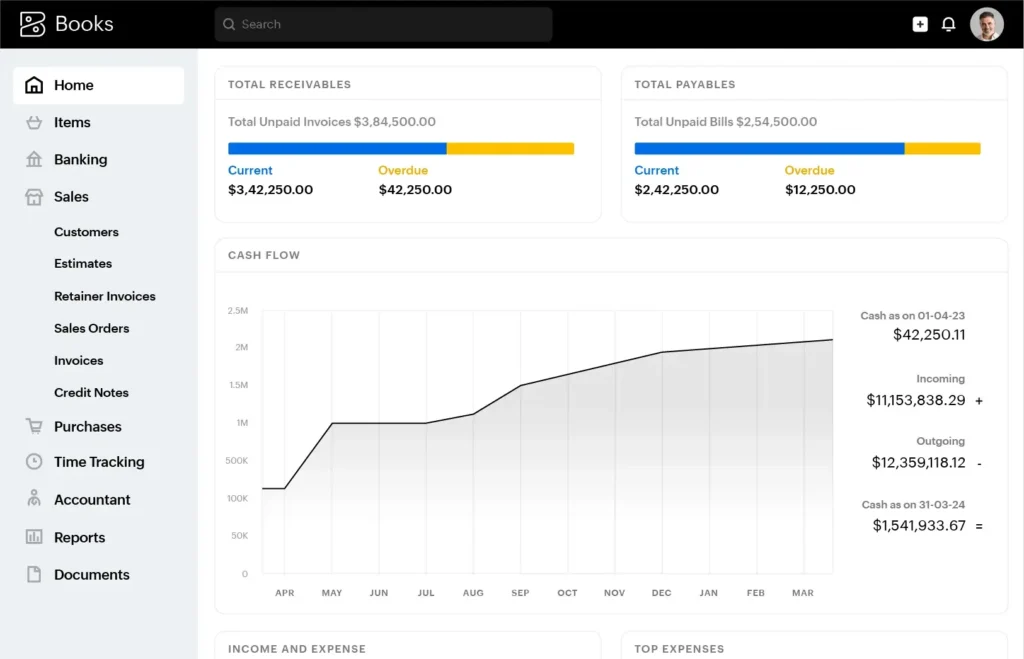
Understanding What is Zoho Books Accounting Software: How does it function as a comprehensive accounting solution? Let’s cut through the marketing noise and get to the point. Zoho Books is the accounting software division of Zoho Corporation, a private Indian company that has been creating business software since 1996. Unlike the venture-backed players that must answer to shareholders demanding quarterly growth at all costs, Zoho has built its reputation on product excellence and steady innovation without the frequent price hikes that plague the industry.
Zoho Books is cloud accounting software designed to help business owners move away from the shoebox method of storing receipts and invoices. The platform digitizes the entire accounting workflow, from receipt capturing to bank reconciliation and financial reporting. The platform operates on a subscription-based pricing model, which is tiered according to the features offered and transaction volume.
What makes Zoho Books stand out from traditional accounting tools is its powerful automation engine. Zoho’s own statistical analysis demonstrates that businesses leveraging this software reduce manual data entry by up to 70% thanks to the automated bank feeds, receipt scanning with OCR in 15 languages and rule-based categorization of transactions. The software is built on the double-entry system, which is considered the gold standard for bookkeeping.
A business owner snaps a picture of an expense receipt on their phone while traveling. The app automatically pulls the vendor name, amount and date from the receipt photo. It then categorizes the expense based on past data and updates all financial records in real-time. No data entry, no reconciliation and no waiting for month-end to see how the business is doing.
Additionally, Zoho Books addresses the concerns of Egyptian and MENA businesses by offering robust security measures, which are paramount for enterprises in the region considering cloud-based tools. Businesses in Egypt, for example, must also deal with e-invoicing, VAT reporting and compliance requirements that require tailored solutions. The nuances of Zoho Books Egypt setup for e-invoicing and VAT tips often go beyond generic accounting guidance, demanding a localized approach to implementation and ongoing usage.
Zoho Books Main Features & Automation Processes
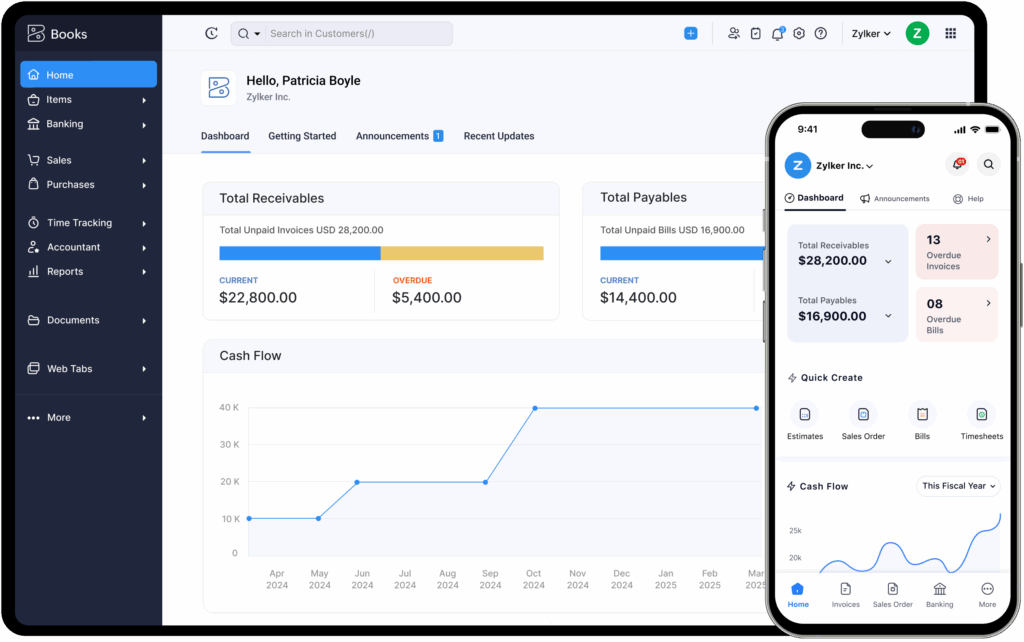
- Receipt scanning with OCR for automated data extraction
- Recurring expenses for subscriptions and bills
- Vendor credits and bill management with partial payments
- Purchase approval workflows at multiple levels
As demonstrated in their video tutorials, Zoho Books is able to automatically reconcile bank transactions by matching them with records in the system. A task that would normally take several hours can now be performed within a couple of minutes. The platform’s bank reconciliation module saves up to 80% of the time spent on manual reconciliation.
Financial Reporting and Compliance
- One-click financial statements (P&L, balance sheet, cash flow)
- Fixed asset management with automated depreciation schedules
- Audit trails and transaction locking for compliance
- Custom report builder tool for tailoring insights to operational use cases
But most accounting software only delivers raw reports—extracting any actionable insight is challenging without specialized tools for analytics. Many businesses unlock more value when they optimize financial reporting with Zoho Analytics to create interactive dashboards and advanced financial models. This capability is vital for transforming basic data into strategic decisions.
لتحقيق أقصى استفادة من تحليلات البيانات المالية، يمكنكم تحسين التقارير المالية مع Zoho Analytics باستخدام التكامل المتقدم من أجل تتبع الأداء المالي بدقة وحساب مؤشرات النجاح الفعلية.
Inventory and Project Management
- Automatically track inventory levels with alerts for reorders
- Time tracking on projects for billable hours
- Job costing to ensure project profitability
- Budget vs.
What is especially great, the mobile app is absolutely functional and not just a “viewer”. The software enables users to create and send invoices, track and approve expenses and transactions and check the status of the business from any location. For businesses with field operations or remote teams, this mobility offers a distinct advantage over desktop-bound solutions.
Zoho Books Benefits: Why Choose It for Your Business?
Let’s be brutally honest about why Zoho Books is gaining traction against its competitors. The benefits are not just an improvement – they are foundational and answer the key pain points businesses face with other platforms.
User Experience That Doesn’t Require an Accounting Degree to Use
The Zoho Books app does not. New users can quickly become productive, thanks to the contextual help and guided workflows that lower the learning curve.

This means businesses can budget efficiently without the concern of unexpected price hikes. Strategic forecasting is especially relevant for regional small businesses, many of which experience fluctuating costs throughout the year. For those seeking clarity in scenario analysis and cost allocation, understanding effective Zoho Books financial planning for MENA SMEs is essential for maintaining growth trajectory without risking compliance or profitability.
Integration Ecosystem That Actually Works
The platform features 40+ integrations with payment gateways, tax services and business tools forming a connected ecosystem rather than isolated data silos.
- Accountant portal for workflow collaboration
- Client portal for seamless communication
- Vendor portal for supply chain integration
- Commenting and task assignment within the app
Security Features Respecting MENA Data Sovereignty
When it comes to data security, Zoho Books provides an enterprise-grade safeguarding system:
- 256-bit SSL encryption
- Two-factor authentication implementation
- Permission-based user roles
Zoho Books grows with your business, so you don’t have to change systems as your business expands from a single entity to multiple ones. This eliminates the painful transitions companies face when they outgrow standard entry-level accounting packages.
Zoho Books Pricing Models & Cost-Saving Scenarios
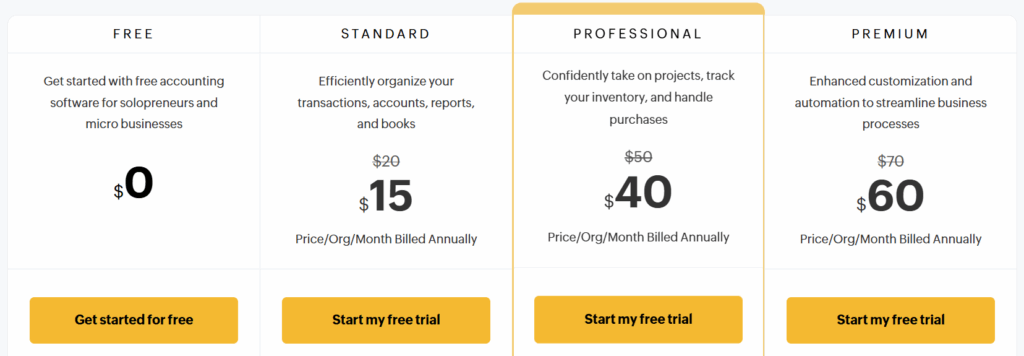
How much is Zoho Books? Let’s Talk Price and Savings Zoho Books offers transparent tier-based pricing, unlike other software providers that hide their fees and constantly try to upsell you on additional features. According to Zoho’s official pricing page:
Cost-Saving Scenarios That Matter
Scenario 1: Small Service Business
A consulting firm with 200 monthly transactions spent approximately 15 hours on manual bookkeeping at $25/hour. Thanks to Zoho Books’ automation, it only takes 3 hours per month.
- Monthly labor savings: $300
- Annual savings: $3,600
- ROI: 600% on a Professional plan ($600/year)
Scenario 2: Growing Retail Business
A retailer processing 1,000 monthly transactions previously paid a part-time bookkeeper $1,500 monthly. The costs of bookkeeping dropped to $500 a month after implementing Zoho Books with automated bank feeds and reconciliation.
- Monthly savings: $1,000
- Annual savings: $12,000
- ROI: 1,666% on a Premium plan ($720/year)
They run all the entities under one Zoho Books Premium account.
- Monthly savings: $140
- Annual savings: $1,680
- ROI of 233% on the Premium plan ($720/year)
Additionally, note that that the free plan is not merely a trial but rather a complete system for businesses earning under $50k yearly.
Zoho Books vs QuickBooks: Feature Comparison Table
| Feature | Zoho Books | QuickBooks Online |
|---|---|---|
| Starting Price | $0 (free plan) | $30/month (Simple Start) |
| Mid-tier Price | $40/month (Professional) | $85/month (Plus) |
| Cost per Additional User | $2.50/user/month | $7/person/month for “Payroll Core” employee access 50/month (annual) |
| Transaction Limits | Yes, depending on the plan | No transaction limits |
| Multi-business Support | Yes, under one account | Separate subscriptions needed per business |
| Mobile App Functionality | Full feature set available | Limited feature set |
| Automation Features | Advanced and customizable workflows | Basic automation tools |
| Customer Portal Access | Available in all plans | Requires third-party integration |
| Vendor Portal System | Included in Premium+ plans only | Not available (third-party integration required) |
| OCR Receipt Scanning Language Support | 15 languages supported | English-only language support |
| Offline Mode Availability | Yes (Desktop app) | No (cloud-based only) |
QuickBooks has merely pivoted from desktop to cloud, dragging its legacy limitations and complexity along. Zoho Books was designed for the cloud from the ground up and hence offers a more integrated experience. According to Zoho’s product page, the company’s platform “automates workflows and stays on top of your finances” rather than emphasizing more technical aspects of financial analysis or accounting. This means that businesses spend less time and resources on financial management and more on growth-oriented activities.
Moreover, the tool’s multi-language OCR is particularly significant for MENA businesses as it addresses Arabic and English documents. Since QuickBooks prioritizes English language recognition, Zoho’s support for multiple languages saves time on manual entries. For companies with multiple entities, Zoho (which requires only one subscription) is much more affordable than QuickBooks (which requires a separate subscription for each business).
For enterprises managing finances in Saudi Arabia, the regulatory landscape brings its own set of challenges. Navigating VAT compliance in retail is not straightforward, and VAT compliance in KSA retail with Zoho Books involves more than simply entering tax rates—it requires system-level automation to manage evolving tax authorities’ requirements and avoid costly errors. And for those working primarily in Arabic, familiarity with ضريبة القيمة المضافة مع Zoho Books can help maintain absolute compliance with local frameworks.
Financial management is never static, and the Saudi business environment requires continual adaptation to local expectations. Business owners seeking to fine-tune internal controls and achieve rigorous budgeting standards frequently explore the nuances of Zoho Books financial management for KSA—a topic that spans not just tax compliance but also multi-entity operations and granular reporting. لمزيد من التفاصيل حول الإدارة المالية بزوهـو بوكـس فـي السـعودية، يتم تناول ذلك من خلال الإدارة المالية زوهو بوكس في السعودية بأحدث الأدوات بما يحقق الانسجام مع القوانين المحلية.
Industry-Specific Use Cases & Success Stories

E-commerce and Retail Businesses
- Real-time inventory tracking
- Automated sales tax calculations
- Multi-channel sales integration
- Barcode scanning
Case Study: An Egyptian e-commerce company selling in MENA markets used Zoho Books for seamless multi-currency transactions and shipping logistics. As a result, accounting labor was reduced by 40% and executives gained better visibility into cash flows.
It is becoming increasingly common for retailers and online merchants to connect their order and inventory systems directly. For those updating store catalogs or reconciling online payments, understanding connecting your e-commerce platform to Zoho Books for automatic order-to-invoice conversion is not just a technical step; it is a core process for real-time visibility and efficiency in financial tracking. The underlying technologies for ربط التجارة الإلكترونية مع Zoho Books directly shape how sales channels, inventory, and accounting remain synchronized at scale.
Service Businesses
- Time tracking (billable hours can be converted into invoices)
- Project budget vs. actuals comparison
- Retainer management and milestone billing
- Professional invoices and client portal
Success Story: A digital marketing agency in Cairo switched from spreadsheet accounting to Zoho Books, utilizing the project module for client work tracking. The agency reported 65% faster client billing cycles and precise project costing, enabling the identification of unprofitable client relationships.
Manufacturing and Distribution
- Bill of materials and production costs tracking.
- Purchase order management and approvals.
- Landed cost calculations for imports.
Case Study: A factory in Alexandria was able to streamline operations using Zoho Books when sourcing raw materials from three different continents. The automated purchase order system, together with the multi-currency enabled supplier payment module, reduced supplier payment processing time by 70% and provided real-time visibility into material costs.
The key is that Zoho Books can be customized to fit into the existing business workflows rather than forcing businesses to adapt their processes around the tool. Together with automation, which is another key element of the platform, it enables businesses to streamline operations for immediate efficiency and obtain long-term strategic benefits.
Step-by-Step Zoho Books Implementation Guide
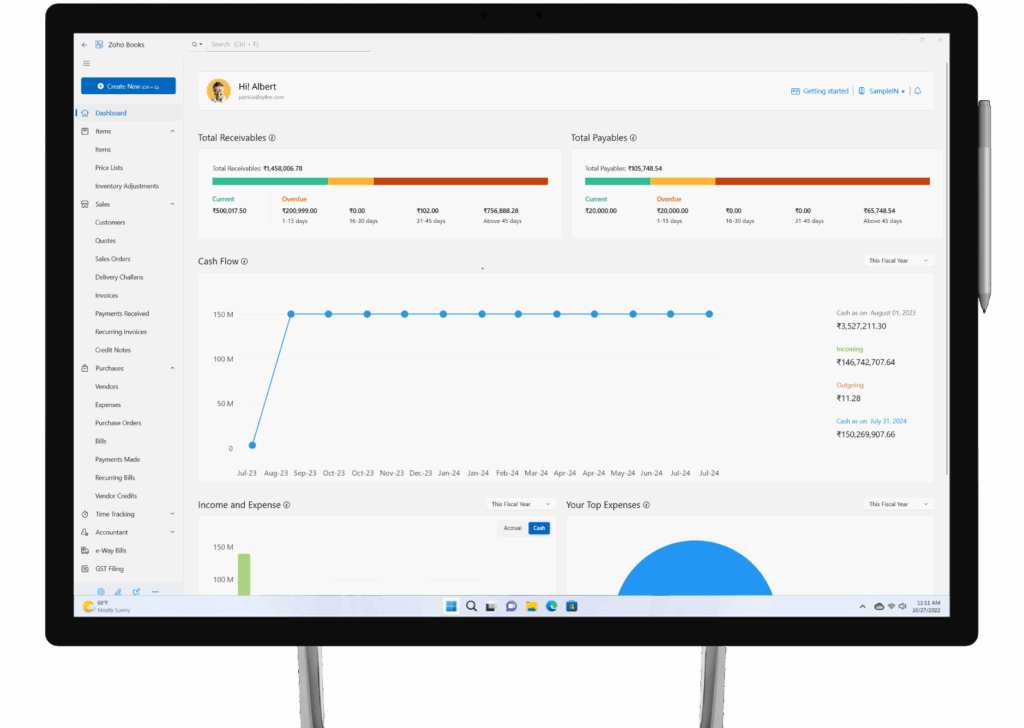
Step-by-Step Zoho Books Implementation Guide: What Does Zoho Books Implementation Involve? Implementing new accounting software doesn’t have to be the nightmare most businesses expect. Each phase should focus on making day-to-day financial controls more streamlined and integrated. For businesses adapting to rapid regulatory or tax environment changes in MENA, best practices include not only data migration but also aligning processes to evolving compliance mandates and automation. Drawing on concrete MENA implementation scenarios described within Zoho Books financial planning for MENA SMEs provides a more grounded understanding of how gradual adoption delivers both speed and compliance.
- Export customer and vendor lists from the previous system.
The platform’s user-friendly design minimizes the learning curve typically associated with transitioning to new accounting software. Another factor was gradual implementation rather than the “big bang” approach. Implement basic accounting functions first and then progressively add more advanced features as the employees gain experience. This reduces resistance and ensures employees fully leverage the platform’s capabilities.
Moreover, businesses can easily follow the module and feature implementation videos to reduce consultant dependency on more complex systems (Zoho official implementation video).
Common Questions: Transitioning to Zoho Books from Manual Accounting
How difficult is data migration from our current system?
The migration process will depend on what you currently use. Zoho Books offers CSV templates for importing customers, vendors, chart of accounts and transactions. If you currently use QuickBooks, Sage has created a tool to help you transfer your records. The spreadsheet-based approach will require you to go through the structured import process to port your data into the platform.
Will we need accounting expertise to use Zoho Books effectively?
Zoho Books is intended for business proprietors instead of accounting professionals. It simply needs to be set up, the rest is handled in the background. However, employing someone with basic accounting principles would be ideal to maximize the software’s outputs.
How Secure Is Our Financial Data in the Cloud?
Zoho Books uses 256-bit SSL encryption, offers two-factor authentication and undergoes regular security audits. The platform meets global security standards and offers audit trails of all activities within the system. For businesses concerned about data sovereignty, Zoho has regional data centers in several countries.
What Happens if We Need Help Implementing the Software?
24/5 live chat and email support, documentation, video tutorials and a community forum. For businesses that require hands-on assistance to implement Zoho solutions, a network of certified consultants is available.
How will Zoho Books handle our specific tax requirements?
The software calculates VAT, GST and sales tax. Zoho Books can be customized to meet the local tax requirements of Egyptian businesses. The tax setup is customizable to fit specific country needs and reporting forms. If your accounting team must deliver on Egypt’s evolving e-invoicing mandate, you’ll encounter specific procedural and technical nuance; resources such as Zoho Books Egypt setup for e-invoicing and VAT compliance detail each regulatory step and help you leverage software modules to maintain up-to-the-minute accuracy.
Can we continue working with our external accountant? Does Zoho Books give accountants free access?
This enables file sharing and collaboration while ensuring security and access controls.
What is the learning curve for non-financial staff?
Most users report being comfortable with basic tasks (e.g., creating invoices, recording expenses) after 1-2 hours of training. The user interface is straightforward and built-in help features make it easy to navigate and understand—especially compared to more traditional accounting software. Additionally, only essential features are available on the mobile app to make it easier for team members to use.
Is Zoho Books Suitable for My Industry?
Zoho Books is adaptable to most industries thanks to its customizable fields, chart of accounts and reports. Service businesses, e-commerce, retail, professional services and manufacturing. Thanks to its custom fields and workflows, it can be tailored for industry-specific needs. For example, a business trading in multiple currencies across the GCC must navigate unique transaction challenges, which are addressed through configuration advice tied to VAT compliance in the KSA retail sector using Zoho Books.
How does Zoho Books handle multiple currencies?
The platform supports more than 180 currencies, with exchange rates updating automatically. The software allows you to perform transactions in any currency while keeping your primary currency for financial reports. This is especially important for MENA businesses that operate in several countries and deal with international suppliers and customers.
Is Zoho Books scalable for growing businesses?
Yes, the product lines and pricing structure are designed to scale from solopreneurs to mid-sized businesses. As your store grows and the transaction volume increases, you can easily upgrade to higher plans without migrating the data. The user-based pricing model also empowers companies to expand their teams without excessive costs. Planning for expansion is not only about managing more users but also preparing for more complex accounting workflows—a challenge illuminated in depth within Zoho Books financial management for KSA expansion scenarios.
What mobile capabilities does Zoho Books offer?
The mobile app (iOS and Android) is robust, offering full capabilities to create invoices, record expenses and time worked and view various financial dashboards. Mobile receipt scanning (real-time input) – One does not need to keep receipts for later processing.
How does Zoho Books compare to Xero?
Zoho Books is more accessible for growing teams and doesn’t charge extra to access features like the client portal and vendor management. Zoho also has better multi-entity support and automation capabilities (Xero needs third-party apps for those).
Is there a free version of Zoho Books?
Yes. Zoho is free for businesses that make less than $50,000 annually. The plan offers core accounting features such as invoicing, expense tracking and basic reporting. The plan is limited to one user and targets businesses that are just starting or moving from manual accounting systems.
How often does Zoho Books update the features?
Zoho operates on a rolling development schedule, with new features being released approximately every 6-8 weeks. Automatic software updates will be applied to your account without the need for IT or business disruption.
Does Zoho Books offer a free trial?
Yes, Zoho offers a 14-day free trial of all plans without payment details. This way, you can determine whether it is the right fit for your business before making a purchase. All the features associated with your chosen plan tier are available during the trial.
Frequently Asked Questions: Zoho Books
Is Zoho Books secure?
Yes, Zoho Books applies 256-bit SSL encryption, two-factor authentication, and allows businesses to enforce permission-based user roles. Data is stored in carefully managed data centers which meet global standards and are regularly audited for compliance.
How is Zoho Books different from Xero?
Zoho Books offers multi-entity support, more built-in workflow automation, and bundled access to the client/vendor portals, while Xero requires third-party add-ons for many of these features. Zoho Books can be more cost-effective and tailored to MENA region needs (multi-language, multi-currency).
How to use Zoho Books for accounting if I’m not an accountant?
The platform is designed for regular business owners with no accounting background. Step-by-step onboarding, contextual tips, and easy workflows make tasks like invoicing, expense tracking, and reconciliations simple. For optimal benefit, basic accounting knowledge is recommended but not required to get started.
Does Zoho Books support my regional compliance requirements?
Yes, Zoho Books can handle VAT, GST, and regional tax calculations. It is easily customized for Egypt and MENA-specific accounting rules and reporting.
What are the main zoho books benefits for small businesses?
- Transparent, affordable pricing
- Feature-rich free plan for businesses making less than $50K/year
- Top-notch automation (receipt scanning, bank feeds)
- Mobile and remote team support
- Multi-currency and multi-language features
- Scalable for growth
Conclusion: Is Zoho Books Right for Your Business?
After the research, this firm does seem to be a serious alternative to the establishment players in accounting software. This type of stability, combined with the tool’s inherent automation capabilities, makes it an attractive option for businesses that are sick and tired of the state of things.
Zoho Books Is Best Suited For:
- The inclusion of client and vendor portals, multi-entity management and mobile apps gives the system an edge over competitors.
- Moreover, the software provides the much-needed data security for businesses in MENA markets, thanks to its multi-currency and multi-language features.
But no tool is perfect for every situation. Businesses with highly specific industry needs and those tightly integrated into the QuickBooks-centric app ecosystem should assess a potential transition to Zoho Books carefully. The most prudent approach is to try Zoho Books in your business through the 14-day free trial. Identifying the right ecommerce platforms for your business is critical because it has a direct impact on the user experience and sales performance. For those pursuing true process automation, seamless customer ordering, and integrated stock control, access to practical examples of connecting your e-commerce platform to Zoho Books in live business environments equips teams to avoid costly missteps while accelerating time to value.
What Is Zoho Books Accounting Software? Aplos is a fierce alternative to the notion professional businesses must accept higher yearly prices and increased complexity as a cost of doing business. For businesses who want to break the cycle, Zoho Books is a great option.
References
- Zoho Books Accounting Software Features
- Zoho Books Video Tutorial
- Zoho Books Official Website
- Zoho Books Pricing
- Zoho Books Features Overview Video