
Introduction: The Importance of Choosing the Right Zoho CRM Implementation Partner
Companies leveraging the right Zoho CRM implementation partner see a 35% faster roll-out and 25% higher adoption rates, according to recent industry analysis. Look, I won’t sugarcoat things. Selecting the wrong Zoho CRM implementation partner is akin to hiring a demolition team to construct your dream house. In 2025’s cutthroat business world, how well your organization implements CRM could be a major differentiator from competitors.
This guide cuts through the marketing fluff with detailed technical steps, ROI-focused case studies and actionable comparison tables for finding a partner that actually delivers. Enterprises at the forefront are now also considering the way low code Zoho Creator is the future of innovation, integrating no-code workflows from day one to accelerate adaptability and reduce IT overhead over time.
Understanding Zoho CRM and the Role of an Implementation Partner
As someone who has watched tech rollouts succeed and fail over the years, I can tell you that a qualified Zoho CRM implementation partner can be transformative. Zoho is a unified platform incorporating over 50 applications for sales, marketing, support, accounting and human resource activities. It provides a 360-degree view of customer interactions and offers omnichannel engagement tools, including AI-driven lead management capabilities through its Zia assistant.
But here’s the thing: right out of the box, it’s nothing more than a tool. The magic is in the customization. Implementation partners ensure that the system is configured to meet industry standards and regulatory requirements. The certified specialists do more than just set up your system. They design and implement solutions that meet the specific needs of your business. They tailor the platform to your specific processes, integrate it with third-party apps and develop bespoke mobile/web solutions when necessary.
The good ones will ensure the deployment’s accuracy on all levels of your organizational structure – and, as a result, streamline your sales processes. The best Zoho CRM implementation partners will have three defining characteristics:
- Expertise in the entire Zoho ecosystem
- Business process improvement experience within your industry
- Change management skills to drive user adoption
As Ahmad Rashwan, CEO of CloudConics and a Zoho-certified expert, says: “The difference between a standard Zoho implementation and an optimized one is like comparing a stock car to a finely-tuned racing machine.” Both will get you from A to B, but only one is built for winning.
They help to facilitate critical collaboration between the employees from different departments. For instance, in organizations with more intricate workforce needs, employee self service portals in Zoho can be implemented to decentralize HR tasks and empower staff, fundamentally changing the way requests and approvals traverse through your HR and operations teams. This, in turn, results in better coordination when engaging customers and faster issue resolution. Additionally, they offer continuous support to ensure your system evolves alongside your business. Zoho partners who become certified undergo extensive training and demonstrate proven implementation experience before earning the title as explained in the Zoho Partner Program.
A successful implementation partner does more than set up the software; it engineers better ways for a business to operate. Sometimes, the impact of a CRM rollout ripples outwards, shaping how HR applications like Zoho People, Zoho Payroll, and even recruitment solutions integrate into the broader corporate tech stack—changing not just customer-facing activities, but internal digital processes such as automating HR processes with Zoho People to streamline onboarding, leave management, and employee data accuracy.
Technical Implementation Steps: Module-by-Module Guide with Visuals
Zoho CRM Overview and Setup
The design and build of your Zoho CRM implementation is the bedrock upon which everything else rests. A proper setup is architectural work that determines how efficiently your business can operate rather than just having the features turned on. The initial setup demands meticulous attention to:
- User Roles & Permissions: The tool should allow you to design a permission structure that both reflects your company’s hierarchy and protects your data. The implementation partner should ensure that the security profiles they set up align with job functions and are not just generic templates.
- Organization Settings: The basic setup determines the overall behavior of your system. If you get territory management settings and fiscal year configuration wrong, your employees will fight the CRM rather than use it efficiently.
- Custom Fields & Layouts: Your business isn’t generic and neither should your CRM be. Implementation partners need to conduct discovery sessions on how your organization uses data and design the screens accordingly.
The most important thing to keep in mind during the initial setup is that all relevant teams (sales, marketing and support) need to use Zoho CRM as a single platform for cross-departmental data sharing. This is where the DIY approach often fails, as it inadvertently creates data silos within the organization. According to Enable LLC’s expert advice, “The most common mistake we see is organizations rushing through the foundational setup to get to the ‘exciting’ features.” This inevitably creates technical debt that becomes increasingly expensive to fix later.” Those looking for a more regional perspective—such as organizations operating in Egypt—must also prioritize Zoho Payroll compliance in Egypt during system architecture to preempt regulatory headaches around local HR payments.
Sales Automation Module Implementation
This is where the rubber meets the road. The sales automation tool you implement should enhance the way your team sells, not merely replicate established processes in digital format. And yet, there’s a parallel discipline emerging: just as workflows automate sales, sophisticated HR modules now enable smarter talent pipelines. Companies aiming to automate every touchpoint along the employee lifecycle often turn to solutions that show how Zoho Recruit filters, ranks, and automates candidate journeys—ensuring no great applicant slips through the cracks while enabling seamless handoff from candidate to onboarded employee.
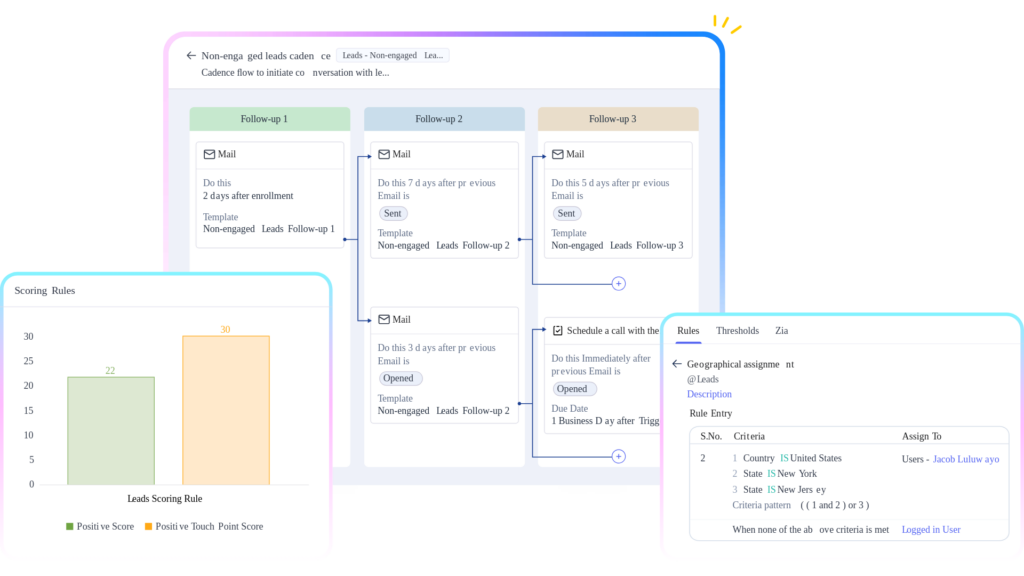
- Lead Scoring & Assignment Rules: Your partner will need to implement scoring logic based on your unique buyer signals and rules that assign leads to the appropriate reps according to territory, expertise and workload.
- Pipeline Customization: Each phase should have clearly defined entry/exit criteria and probability settings that reflect the historical conversion rates.
- Workflow Automation: This is the game-changer most organizations underutilize.
- Automatic tasks creation for follow-ups.
- Notifications on deal stage progressions.
- Alerts when deals stall for too long.
- Automated workflows to generate quotes from deals.
- Approval flows before discounts are granted.
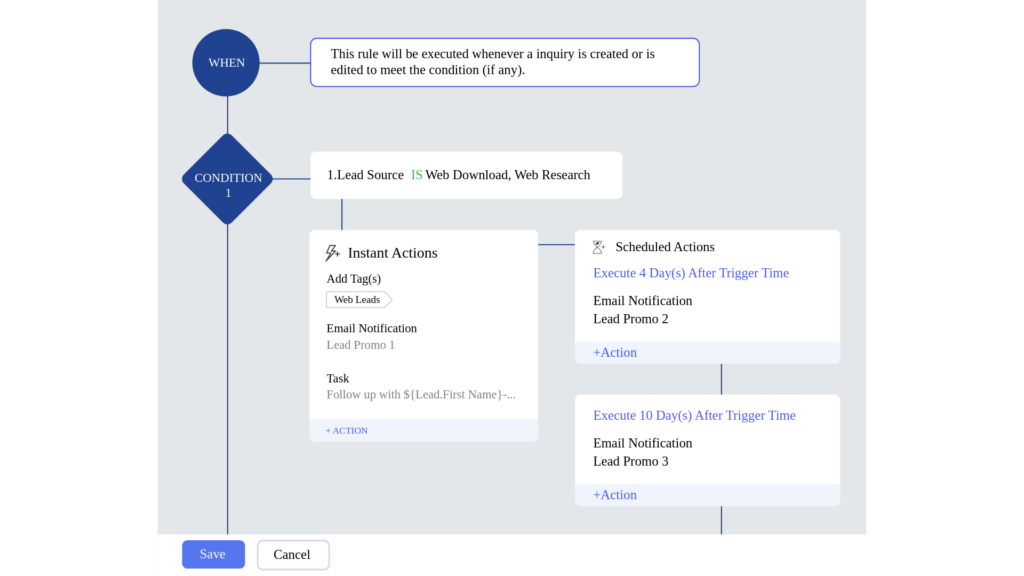
According to SixtyOneSteps’ technical analysis, “Advanced workflow automation scripts and API usage enable complex business logic customization that can reduce manual process hours by up to 45% while accelerating sales cycle completion”. For HR and admin teams tasked with implementing transformations at pace, adopting a frame such as the Zoho HR implementation SprintsAI method empowers accelerated, sprint-based rollouts—ensuring people modules are up and running in weeks rather than months.
Marketing Automation and Integration Module
Integration of Marketing Campaigns: What is involved in the integration of marketing campaigns? The marketing-sales disconnect slays revenue potential in countless companies. Your Zoho implementation partner needs to find a way of making the different systems “talk” to each other.
- The leads generated by your partner’s marketing campaigns, together with all pertinent data, need to seamlessly flow into your CRM for sales follow-up.
- Third-Party Tools Integration: From email marketing platforms to social media and webinar tools, all systems must communicate harmoniously and ensure seamless data flow in both directions. Forward-thinking firms are discovering that integrating tech project oversight with CRM brings powerful cohesion; the emergence of tech projects with Zoho Projects highlights how product development, marketing, and support can converge on one timeline, creating transparency that would otherwise be lost across department silos.
Lead Nurturing Automation: Implement complex drip campaigns and nurture sequences that automatically advance leads through your funnel based on their engagement behavior. This capability is also leveraged outside classic sales—and with increasing complexity of technology initiatives, even complex tech projects require multi-department collaboration, integrating technical rollout schedules, marketing rollouts, and cross-team engagement in real time.
- Better lead generation and higher conversion rates.
Reporting & Analytics Module
What reporting capabilities provide actionable business intelligence? Generic dashboards are virtually useless. Your implementation partner needs to effectively translate Zoho’s out-of-the-box reporting into the kind of analytics that truly matter for your particular business model. In organizations prioritizing operational oversight, reporting needs often reach beyond sales and finance: specialized dashboards for HR modules—such as those referenced in the Zoho People implementation guide for MENA SMEs—can surface real-time workforce analytics, showing headcount, attendance, and skill distribution at a glance.
- Executive Dashboards: High-level visuals of key metrics such as pipeline health, forecast accuracy and revenue trends.
- Operational Dashboards: Team and employee performance, activity adherence and conversion rates.
- Custom Reports: Get answers to your specific business questions and build reports that compare territory performances, analyze product mix, etc.
- Automated Distribution: Ensure that key stakeholders always have the precise information they need, exactly when they need it.
The difference is startling: Customized Executive Intelligence Dashboard.
Data Migration and Security Best Practices
What ensures seamless, secure data migration? Data migration is where implementations go to die. Your partner needs to employ a battle-tested methodology that ensures your data arrives intact and usable. The migration process should follow the flow chart below:
- Source Data Audit: This involves the analysis of the data in the current system to identify any instances of missing data and duplication.
- Field Mapping and Transformation Rules: Identify how data will be standardized and enhanced during migration.
- Test Migration: Select a small set of data to migrate and observe the results.
- Validation: Ensure that all data fields are correctly imported.
- Production Migration: Execute the full migration with rollback procedures in place.
- Data Integrity Checks: All fields in the implementation partner’s system need to be aligned with the source data structure and tested for consistency. There is an added dimension in tech-driven environments: when integrating DevOps and mainstream business platforms, workflows such as those seen in Zoho Projects & DevOps elevate the importance of maintaining traceability and automated compliance checks during large-scale system migrations.
- Rollback Measures: A policy for reverting to the legacy CRM system after deployment must be in place to prevent data loss as explained in TuvisTech’s migration guide.
Real-World Case Studies: Zoho CRM Implementation Partner Success Stories
Case Study 1: B2B SaaS Company
What quantifiable outcomes demonstrate successful implementation?
A mid-sized SaaS company was drowning in manual work. Sales reps were spending over 15 hours per week on data entry, lead qualification was inconsistent and the sales cycle averaged 75 days. Working with a certified Zoho implementation partner achieved the following:
“Our Zoho implementation partner didn’t just integrate a system; they engineered a complete overhaul of our sales process. The difference in our ability to scale efficiently has been night and day.”
Case Study 2: Mid-Market Retailer

How do implementation partners address retail-specific requirements?
A retail chain with 12 locations had fragmented customer records, no standard follow-up process and no visibility into cross-store shopping behavior.
- Unified POS data for all locations in CRM
- Integration of loyalty program into CRM
- Inventory tracking per store in CRM
- Centralized customer purchase history and preferences profiles
- Automated marketing campaigns based on customer behavior
Zoho retail specialist customized the platform to the specific retail needs such as inventory and POS integrations, omnichannel sales streamlining and customer loyalty programs management.
“What impressed us most was how quickly our team adopted the system. The partner designed a comprehensive training program for different roles that facilitated a seamless transition.” – Ahmed Mahmoud, Operations Director
Cost Considerations & Zoho CRM Implementation Calculator

Let’s talk money, because implementation costs can vary significantly. Therefore, understanding their pricing structures and what the brands offer is critical for proper budgeting. Implementation partners typically offer three pricing models:
- Hourly Rate: $75-150/hour depending on expertise and region
Best for: Small projects with a clearly defined scope
Risk: Scope creep can lead to budget overruns
- Fixed-Fee Package: $5,000-25,000 for full implementation
Best for: Mid-sized companies with standard requirements
Advantage: Predictable budgeting with defined deliverables
- Phased Implementation: Initial installments plus continuous optimization
Best for: Companies with complex needs that will implement the system gradually.
Structure: 50% initial, 50% distributed as needed.
Most successful implementations include 3 to 6 months of post-launch support to ensure the tool is adopted by employees and any further needs are addressed. This usually adds 15-25% to the system implementation cost but has a high ROI because the system is used as designed.
This consultative approach typically saves the client 20–30% over what they would pay buying independently” according to Kelevo Software. In parallel, project teams often face budgetary pressures when it comes to broader technology rollouts. By following methodologies developed specifically for Zoho platforms—such as those used in tech projects with Zoho Projects—teams can preempt hidden costs and align investment with delivery outcomes that can be measured and compared at each stage.
- What will it take to train your team?
- How much data needs to be migrated and how complex is the migration?
- How many integrations need to be built and are they straightforward or custom?
- What level of customization is required to adapt the tool for your business needs?
- What ongoing support will you need from an external partner or internal resources?
Understanding implementation costs is crucial. The cheapest implementations tend to become the most expensive in the long run due to reimplementation costs, productivity losses, etc. In the context of mid-market companies in the MENA region, practical guides such as the Zoho People implementation guide for MENA SMEs serve as invaluable blueprints for anticipating hidden costs in HR transformation projects running parallel to CRM rollouts.
Comparison Table: Zoho CRM Implementation Partner vs. DIY vs. Other CRMs
| Approach | Time to Deploy | Typical Outcomes | Pros | Cons | Cost Range |
|---|---|---|---|---|---|
| Zoho CRM Implementation Partner | 4-12 weeks | • 35% faster adoption • 25% higher ROI • Customized workflows • Optimized business processes | • Expert guidance • Best practice implementation • Reduced internal resource burden • Ongoing support | • Higher initial investment • Dependency on partner quality | $5,000-$25,000+ |
| DIY Implementation | 8-20 weeks | • Basic functionality • Limited customization • Higher abandonment rate | • Lower initial cost • Complete control • In-house knowledge | • Steep learning curve • Opportunity cost of staff time Certified partners invest considerable resources in structured training programs and are mandated to maintain Zoho certifications. In contrast, DIY implementations typically receive minimal, informal training. | Varies; often lower up front but higher over time |
What stands out is Zoho’s ecosystem of 50+ apps that connect seamlessly, as opposed to fragmented tools offered by most competitors. And, it can be taken to the next level by an expert implementation partner. As CloudConics has noted, “Partner-led implementations dramatically reduce post-launch issues and prevent failed deployments, which affect up to 63% of self-managed CRM implementations”. When project requirements grow more complex—like orchestrating parallel deployments of sales, HR, and operations modules—it’s critical to coordinate all moving parts. Using تكامل Zoho Projects وDevOps as the backbone for integrating continuous deployment and project tracking eliminates misalignments that often cause costly overruns or post-launch rework.
FAQ: Solving Common Zoho CRM Implementation Challenges
What Are the Most Common Data Migration Errors and How Are They Resolved?
Some of the common causes of data migration errors include poor field mapping, duplicate entries and inconsistent data formats. Implementation partners address this through validation export/imports (Ghana, Namibia and Zimbabwe). Data stewards use various tools to identify and merge duplicate records, standardize data formats and ensure that related tables or databases use consistent and accurate information. For more complex cases, partners usually develop custom scripts for the migration.
How do implementation partners ensure a seamless integration of the new system?
Integration issues are resolved through the partner’s platform expertise, developer resources and connector knowledge. When standard integration tools are not enough, certified partners use Zoho’s developer platform to build the needed connections. Performing data integration requires extensive knowledge of programming and software development to implement proper error control and monitoring systems.
What strategies improve user adoption during implementation?
Low adoption is the silent killer of any project implementation and CRM is no exception. Partners address this by developing role-based training programs and user guides to facilitate a phased implementation approach. They create programs for the super users. They build executive dashboards that show executives the value of community. Zoho states that “structured change management is as important as the technical implementation for driving adoption” according to Zoho’s partner insights.
How do implementation partners handle customization limitations?
When customization options are exhausted, Zoho partners use the developer platform to extend the system’s functionality. This involves creating custom functions, writing Deluge scripts to implement complex business logic and building new modules if needed. The key is to know when to build custom solutions in Shopify versus when to extend it via development.
When to Work with Your Partner vs. Internal Resolution?
Consider reaching out to a partner when undertaking major system modifications, complex integrations, or large-scale migrations. With adequate training, internal teams can manage day-to-day administration, basic report generation and minor system tweaks. The best implementation partnerships clearly identify and delineate these roles.
References
- Zoho CRM Plus Features, Modules & Benefits for 2025 (ALP Consulting)
- Advantages of Becoming a Zoho Consulting Partner (Kelevo Software)
- Zoho CRM Plus Partnership Program (Zoho)
- Zoho CRM Implementation Partners (SixtyOnesteps)
- Zoho Consulting Partner Benefits (Zoho)
- Zoho Consultant or Partner? (CloudConics)
- Expert Zoho Consulting Services (Enable LLC)
- Zoho Partners Directory
- Scalable Success with Zoho Premium Partner in 2025 (TuvisTech)
- Benefits of Zoho Implementation Partner Over Freelancer