
Introduction
It’s 11pm on the last day of the month, and the commission spreadsheet is open — 40-something tabs, a VLOOKUP referencing a column someone renamed back in March, and a filename that’s somehow reached “Commission_Tracker_FINAL_v3_USE_THIS.xlsx.” Then the message comes in from your best rep: “Hey, my number looks off.” This scene repeats at growing companies every single month, and it’s rarely one dramatic mistake — it’s the slow accumulation of small ones that eventually costs real trust, real money, or both.
The people this affects most are also the people you can least afford to frustrate: your top performers, whose commission checks tend to be the largest and most complex, and therefore the most exposed to a single wrong formula and in most need to a sales commission software.
Why Commission Spreadsheets Break as You Scale
A commission spreadsheet that works fine for five reps on a flat percentage plan starts breaking the moment reality gets more complicated — tiered rates, accelerators, splits between reps, mid-cycle plan changes, clawbacks on refunded deals.
Every added layer of complexity means more nested formulas, more manual data entry pulled from CRM exports, and more places a single wrong cell reference can quietly corrupt an entire month’s payouts.
None of this is a failure of the finance team’s diligence — it’s what happens when a tool built for general-purpose calculation gets pushed into a job that needs an audit trail, version control, and real-time accuracy it was never designed to provide.
What Commission Errors Actually Cost
The scale of this problem is well documented, and it isn’t unique to commissions — it’s the same underlying issue behind spreadsheet risk generally. Peer-reviewed research summarized by Frontiers of Computer Science found that roughly 94% of operational business spreadsheets contain at least one error — the same research already cited elsewhere in this content series, applied here to a use case where the stakes are higher than most: real people’s paychecks.
Commission errors specifically carry costs beyond the dollar amount involved. An underpaid rep loses trust in the company — and top performers, who have the most leverage to leave, are often the ones most affected by miscalculated tiers or accelerators. An overpaid rep rarely reports it, and clawing back an overpayment months later damages the relationship even when the company is technically in the right.
Disputes eat finance team time investigating what happened, and repeated errors erode confidence in the compensation plan itself, regardless of how well-designed the plan actually is.

What Sales Commission Software Actually Needs to Do
Before evaluating any specific sales commission software, it helps to be clear on what “solved” actually looks like: commission calculations pulling directly from live deal data (not a manual CRM export), support for the specific plan structures your company actually uses (tiers, splits, accelerators, clawbacks), a visible audit trail showing exactly how each number was calculated, and a defined process for reps to flag and resolve disputes — rather than an informal Slack message and hoping someone remembers to check.
This isn’t unique to any one industry — real estate brokerages using commission-based structures face an especially acute version of this problem, since broker splits and tiered rates by unit type compound the same spreadsheet fragility even faster.

How Zoho CRM Handles Commission Calculation
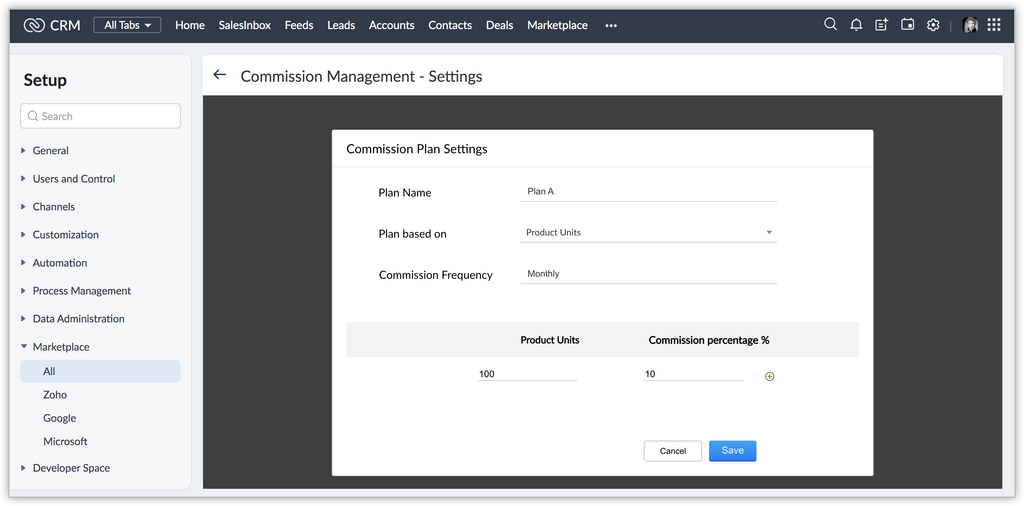
Here’s the honest technical picture, not an oversimplified pitch: Zoho CRM doesn’t ship with a dedicated, out-of-the-box commission management module the way specialized commission platforms do. What it does offer is a Commission Rate field on Products and custom functions (Deluge scripting), as documented in Zoho’s own developer community, that can calculate commission directly from Quote or Deal data automatically — no manual export, no separate spreadsheet, no re-entry.
For straightforward commission structures — flat rate or simple tiers tied to deal value — this native approach genuinely eliminates the spreadsheet problem: the calculation happens the moment a deal is marked won, using the same data already in the CRM. For genuinely complex compensation plans — multi-tier accelerators, cross-team splits, clawback logic spanning multiple pay periods — a dedicated commission management platform integrated with Zoho CRM via API is often the more realistic answer than forcing everything into custom functions.
Knowing which situation you’re actually in before building anything saves significant rework later, and is worth an honest assessment rather than assuming the free native option will scale to any level of complexity.
The PyramidBITS Implementation Angle
Getting commission automation right starts with an honest read of your actual plan complexity, not a generic build. PyramidBITS’s approach includes:
- Mapping your real commission structure first — every tier, split, and edge case — since a partial build that misses an edge case just creates a new kind of error to chase down.
- Building native Zoho CRM commission calculation via Products and custom functions where the plan structure genuinely supports it, tied directly to deal data the same way Zoho CRM Blueprints enforce other business rules automatically.
- Recommending a dedicated commission platform integration honestly, when plan complexity genuinely exceeds what native CRM automation should reasonably handle — matching tool to actual need rather than force-fitting everything into one system.
- Connecting the calculation to reporting, so both finance and sales leadership can see commission accuracy trends over time — our guide to advanced analytics in Zoho CRM covers this reporting layer. This is the same underlying discipline behind why growing sales teams outgrow spreadsheets across every part of the sales process, not just commissions specifically.
Getting this sequence right the first time matters more than it might seem — a commission system reps don’t trust after a rocky launch is hard to win back credibility for, even once the underlying calculation is fixed.
Practical Next Steps
Before building or buying anything, these steps clarify what you’re actually dealing with:
- Document your current commission plan in full detail — every tier, split, and exception — even if it currently only exists in one person’s head or a scattered set of rules.
- Count how many hours are spent calculating and validating commissions each cycle. This is the number that makes the cost of the status quo concrete.
- Pull your last two quarters of commission disputes and identify how many trace back to a formula error versus a genuine plan ambiguity — these need different fixes.
- Decide honestly whether your plan complexity fits native CRM automation or genuinely needs a dedicated commission platform — this determines your entire implementation path.
FAQs
What is sales commission software?
Sales commission software automates the calculation, tracking, and payout of sales commissions based on defined plan rules — tiers, splits, accelerators — pulling directly from deal or sales data instead of relying on manually maintained spreadsheets.
Can Zoho CRM calculate sales commissions natively, or do I need separate sales commission software?
For straightforward plans, Zoho CRM’s native tools are often enough, using the Commission Rate field on Products combined with custom functions that calculate commission directly from Quote or Deal data. More complex multi-tier or split-heavy plans often benefit from dedicated sales commission software integrated with Zoho CRM rather than stretching native functions past what they were designed for.
How much do commission calculation errors actually cost a company?
It varies, but the underlying spreadsheet-error rate found across research (roughly 94% of operational spreadsheets contain at least one error) means the risk is structural, not occasional. Beyond direct dollar cost, errors damage rep trust and consume finance team time on disputes and corrections.
Is it better to build commission automation natively in Zoho CRM, or use a dedicated platform?
It depends entirely on plan complexity. Simple, flat, or lightly-tiered structures are genuinely well-served by native Zoho CRM automation. Complex multi-tier, multi-split, or clawback-heavy plans usually justify a dedicated commission platform connected via integration.
How long does it take to automate sales commission calculation?
For straightforward plans built natively in Zoho CRM, a properly scoped implementation typically takes a few weeks. Integrating a dedicated commission platform for more complex plans adds additional time for that platform’s own setup and CRM integration.
Book a Free Zoho CRM Demo
If your commission process still depends on a spreadsheet nobody fully trusts by month three of using it, that’s worth fixing before the next payout cycle, not after the next dispute.
Book a free Zoho CRM demo with PyramidBITS and find out whether native automation or a dedicated platform is the right fit for your actual plan.