Introduction
Ask any HR team in Egypt what fills their day, and the answer is rarely strategy. It is “How many leave days do I have left?”, “Can you send me an HR letter?”, “I forgot to check in yesterday” and “Did my manager approve my request?”, arriving by WhatsApp, email and in person at the HR office door. Employee self service moves those everyday requests from HR’s inbox into a portal and mobile app where employees handle them directly, with the right rules and approvals built in.
This guide explains what employee self service (ESS) is, which requests it removes from HR’s desk, how it works for factory and retail shift teams as well as office staff, and how Zoho People delivers it.
What Is Employee Self Service (ESS)?
Employee self service is a part of an HR system that lets employees view and update their own information and complete routine HR tasks without going through HR for each one. Typically, that includes checking leave balances, applying for leave, checking in and out, viewing documents, updating personal details and raising questions to HR.
An ESS portal is the web version, usually opened from a laptop or office PC. An ESS mobile app gives the same access on a phone, which matters most for employees who don’t sit at a desk. In both cases, the data comes from the same HR database, so what the employee sees is what HR and payroll see.
Employee self service is often paired with manager self service, where line managers approve requests, view their team’s attendance and leave calendar, and delegate approvals when they travel. Together, they replace a chain of messages with one process that everyone can follow.
The Hidden Cost of Running HR as a Help Desk
Each individual request looks small. However, the volume adds up quickly in a company with a few hundred employees.
First, there is the time. An HR officer who answers twenty leave-balance questions a day by checking a spreadsheet loses hours each week to work that adds no value. Second, there are errors. When a request arrives on WhatsApp and is re-typed into Excel, the date, type or number of days can easily be recorded wrongly. Third, there is no audit trail. If an employee says their manager approved a day off by phone, there is often no record to confirm it.
Finally, there is the employee experience. In factories and retail branches, staff may have to queue at the HR office during a break, or wait for a supervisor to forward a paper form. That frustration shows up in engagement and, eventually, in turnover.
Employee self service doesn’t remove HR’s role. Instead, it removes the copying, chasing and repeating, so HR can focus on hiring, performance, policy and the cases that genuinely need a person.
8 Requests Employee Self Service Takes Off HR’s Desk
The fastest way to see the value is to compare common requests before and after ESS:
| Request | Without employee self service | With employee self service |
|---|---|---|
| “How many leave days do I have?” | HR checks a spreadsheet and replies | Employee sees the live balance by leave type |
| Applying for leave | Message or paper form, then manual entry | Request submitted in the app, routed to the manager automatically |
| Forgot to check in | Message to HR, manual correction | Regularization request with manager approval |
| Overtime or permission requests | Verbal approval, no record | Request logged with date, reason and approver |
| Updating phone, address or bank details | Email to HR, re-typed into records | Employee updates profile; sensitive fields can require approval |
| HR letters and documents | Requested by WhatsApp, prepared manually | Shared files available in the employee’s own space |
| “Who approves my request while my manager travels?” | Requests wait or go missing | Manager delegates approvals temporarily |
| General HR questions | Scattered across chats and emails | Raised as a case, tracked until resolved |
Even if only half of these move fully into self-service, HR’s daily interruptions fall noticeably, and every remaining request has a clear owner and status.
Employee Self Service for Shift Teams in Factories and Retail
Most ESS content assumes everyone works at a desk. In Egypt, many employees don’t: they work shifts on a production line, in a warehouse or in a retail branch. For them, employee self service has to work on a phone, in a few taps, during a short break.
Three capabilities make the difference for shift teams:
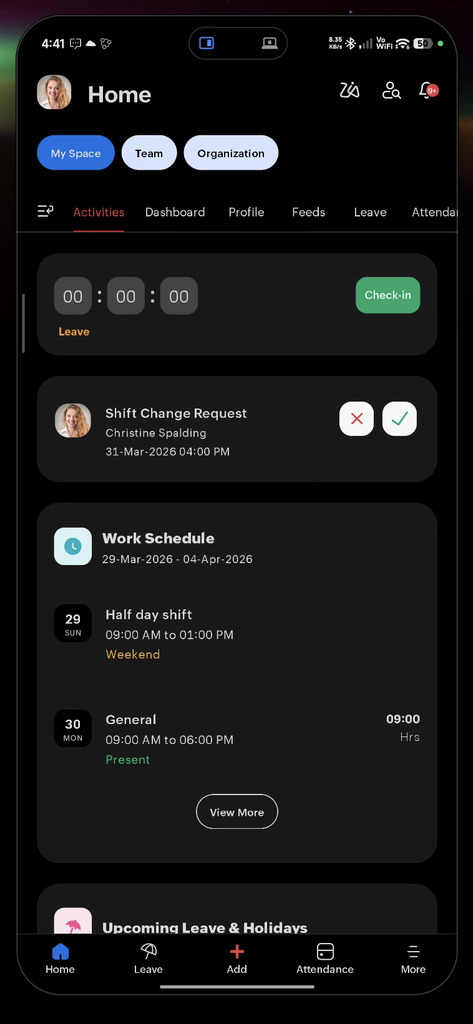
- Mobile check-in and check-out. Employees can mark attendance from the mobile app, and organizations can enable location tracking for on-site staff. Where biometric devices are already installed, attendance can flow from the device instead. Our guide to the biometric attendance system with Zoho People explains how that connection works.
- Regularization and permission requests. A missed punch or a late arrival becomes a request the supervisor approves in the app, rather than a correction HR makes days later.
- Leave from the phone. Shift workers can apply for leave, see their balance and check approval status without visiting the HR office.
As a result, branch and plant managers spend less time relaying messages, and HR receives clean, approved data instead of a stack of notes at month-end.
[Insert Image: Factory worker checking in on a mobile phone at the start of a shift] Alt text: employee self service mobile check-in for factory shift teams
How Zoho People Delivers Employee Self Service
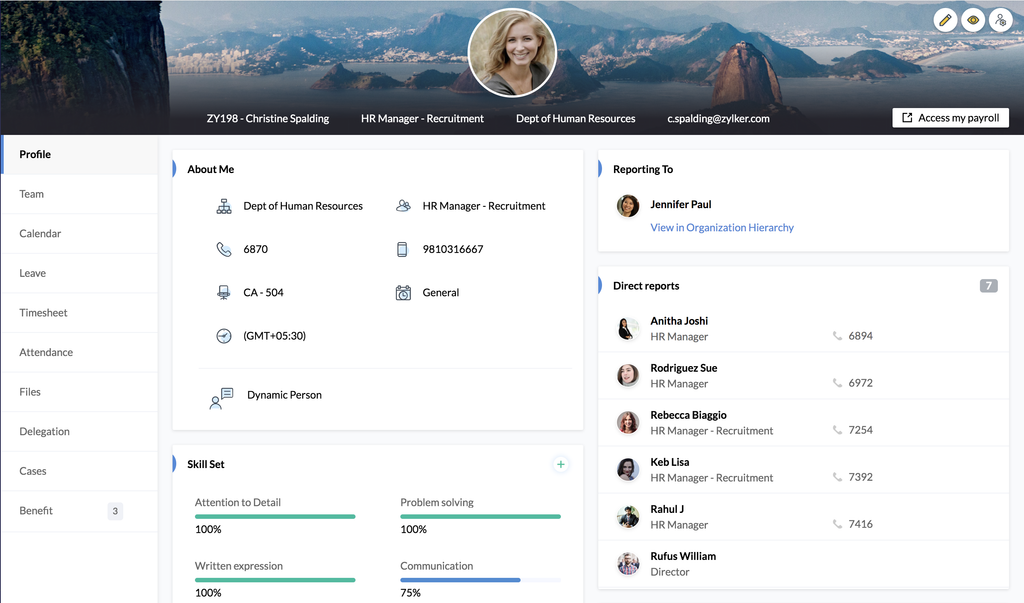
Zoho People is the HR platform within Zoho HR Suite, and employee self service is built into it. According to Zoho’s employee self-service guide, each employee has a self-service space with tabs for their profile, team, calendar, leave, timesheets, attendance, delegation, files and cases. Here is what each part changes in practice:
- Profile: personal and work details, skills and reporting line in one place. HR stops answering “who do I report to?” and stops re-typing updated phone numbers.
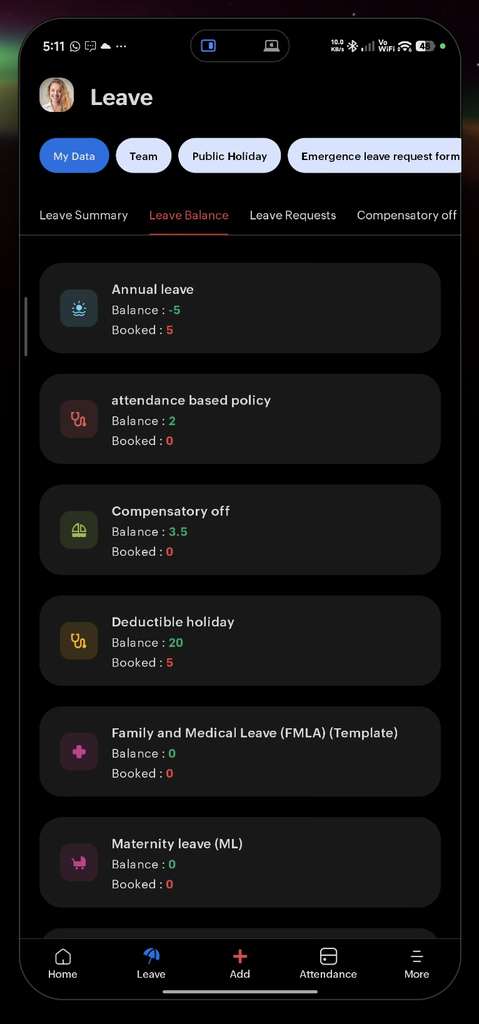
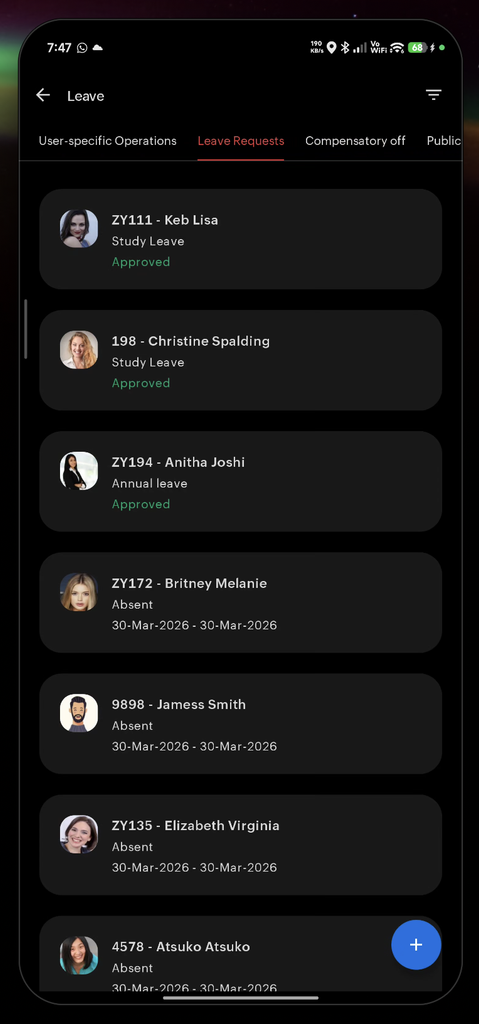
- Leave: live balances, applied leave and new applications. Employees plan time off themselves, and managers approve with one tap.
- Attendance: check-in and check-out, daily hours, payable days and weekly or monthly views. Disputes about hours are settled by data, not memory.
- Timesheets: time logs by job, by timer or manual entry. Project and client time becomes visible without separate sheets.
- Delegation: managers hand approvals to a colleague temporarily or permanently. Requests no longer stall when someone is on leave.
- Files: documents shared with the employee, plus their own uploads. HR letters and policies are available without a WhatsApp request.
- Cases: questions raised to HR are tracked until resolved. Nothing gets lost in a chat thread.
The Zoho People mobile app gives employees and managers the same core actions on their phones, including attendance, regularization and on-duty requests, and leave, based on how the organization has configured the system. Employees can also choose their preferred language and time zone in their personal settings.
Payslips deserve a note. Payslip access through self-service depends on how payroll is set up and connected, so it should be confirmed during implementation rather than assumed. For more on how Zoho People handles the request-and-approval flow, see our Zoho People leave management overview.
Built-In Rules: Where Self-Service Supports Compliance
A good ESS setup doesn’t just collect requests; it checks them against your policies before they reach a manager. That matters more since Egypt’s Labor Law No. 14 of 2025 took effect in September 2025.
For example, the law caps emergency leave at seven days a year, with no more than two consecutive days, deducted from annual leave. When that rule is configured in the leave policy, the employee self service screen applies it at the moment of the request, instead of HR catching a mistake weeks later. Similarly, overtime and permission requests carry a date, reason and approver, which gives you a record if questions arise later. And because documents and requests live in one system, employee records stay complete and retrievable, which supports the new five-year retention requirement for employee files.
Security matters too. Role-based permissions control who sees what, and employees choose what personal details colleagues can view. For a deeper look at data protection, read why your HR data is safer in the cloud with Zoho.
[Insert Image: Leave request screen showing an emergency leave rule warning] Alt text: employee self service enforcing leave rules at the request stage
A 6-Step Plan to Launch Employee Self Service
Rolling out ESS is as much about habits as software. This sequence keeps adoption high:
- Clean employee data first. Confirm hire dates, managers, departments and leave balances. If the first balance an employee sees is wrong, trust is lost on day one.
- Decide what employees can edit. Allow direct edits for low-risk fields such as phone numbers, and require HR approval for sensitive ones such as bank details.
- Map approval chains. Define who approves what for every department and branch, including delegates when managers are away.
- Start with leave and attendance. These are the highest-volume requests and show value fastest. Add files, cases and timesheets once the basics are used daily.
- Train in short, practical sessions. Show employees three actions on their own phones: check your balance, apply for leave, fix a missed check-in. Short Arabic guides or videos work better than long manuals for shift teams.
- Stop accepting the old channels. After a transition period, politely redirect WhatsApp and paper requests to the app. Otherwise, the old habits never disappear.
When PyramidBITS implemented Zoho HR for Sprints.ai, leave had been managed on Google Sheets with manual approvals and onboarding ran through emails and checklists. The rollout moved those processes into Zoho People and was supported by guided demos, training and SOPs, while the company grew from about 35 to about 95 employees. For the wider picture of connecting HR processes, see HR operations with the complete Zoho suite and our guide to automating HR processes with Zoho People.
How to Measure Whether Employee Self Service Is Working
Track a few simple indicators for the first three months:
- Share of leave requests submitted through ESS rather than messages or forms.
- Average approval time from request to manager decision.
- HR messages per week on WhatsApp and email about balances, letters and corrections.
- Profile completeness, such as the share of employees with an up-to-date phone number and emergency contact.
- Attendance corrections at month-end, which should fall as regularization moves into the app.
If these numbers move in the right direction, employee self service is doing its job. If they don’t, the cause is usually unclear approval chains or old channels still being accepted.
Frequently Asked Questions
What is employee self service in HR?
Employee self service (ESS) is the part of an HR system where employees view and manage their own HR information, such as leave balances, attendance, documents and personal details, and submit requests that are routed to managers for approval.
What is the difference between ESS and MSS?
ESS is for employees to handle their own tasks. Manager self service (MSS) is for line managers to approve requests, view their team’s attendance and leave, and delegate approvals. Most HR systems, including Zoho People, combine both.
Can employees access employee self service on their phones?
Yes. Zoho People has a mobile app for Android and iOS that supports attendance, regularization requests, leave and other actions, depending on how the organization has configured it.
Can employees see their payslips through self-service?
That depends on how payroll is set up and connected to the HR system. It should be confirmed during implementation, especially for Egyptian payroll rules.
Is employee self service secure?
A well-configured ESS uses role-based permissions, so employees see only their own information and managers see only their teams. Sensitive changes, such as bank details, can be set to require HR approval.
Give HR Its Time Back
Every leave-balance question, missed check-in and HR letter request that moves into employee self service is one less interruption for HR and one less delay for the employee. For Egyptian companies with office staff, plant workers and branch teams, a mobile-first ESS is often the quickest HR improvement employees actually notice.
PyramidBITS implements Zoho People around your real approval chains, policies and shift patterns, and trains employees and managers in Arabic so the new routine sticks.
Book a free demo with PyramidBITS and see what employee self service would look like for your teams.