Introduction
Most explanations of Odoo ERP list its apps: Sales, Inventory, Accounting, Manufacturing, Point of Sale and dozens more. That tells you what exists, but not what changes on a Tuesday morning in your warehouse, at your tills or on your production line. This guide takes a different route. It follows four everyday flows, from customer order to cash, from purchase to supplier payment, from raw material to finished goods, and from the till to the books, and shows how each one runs inside Odoo ERP for Egyptian factories and retail chains. Along the way, it covers what Odoo does on its own, what needs proper setup, and how to choose where to start.
What Is Odoo ERP?
Odoo is a modular business platform made of separate apps that share one database. Each company installs only the apps it needs, such as Sales, Purchase, Inventory, Manufacturing, Point of Sale and Accounting, and adds more as it grows. Because every app reads and writes the same data, a single action updates every department that depends on it.
That shared database is what makes Odoo ERP an ERP rather than a collection of tools. A delivery updates stock and accounting. A production order consumes raw materials and records cost. A sale at the till reduces branch stock and posts to the books. If you’re still deciding whether your business needs an ERP at all, our guide to the signs you’ve outgrown inventory software is a good place to start.
Odoo comes in two editions: Community, which is open source, and Enterprise, which adds apps, features and official support. Which one fits depends on the apps and local requirements you need, as our Odoo Community vs Enterprise comparison explains.
The Odoo ERP Apps That Matter for Factories and Retailers
You don’t need every app on day one. For most manufacturers and retail chains in Egypt, these are the core:
| App | What it does | Who uses it daily |
|---|---|---|
| Sales | Quotations, sales orders, price lists | Sales team, branch managers |
| Purchase | Requests for quotation, purchase orders, vendor bills | Purchasing team |
| Inventory | Warehouses, locations, transfers, reordering rules | Storekeepers, logistics |
| Manufacturing | Bills of materials, production orders, work centers | Planners, production supervisors |
| Point of Sale | Till sales, payments, session closing | Cashiers, branch managers |
| Accounting | Journals, invoices, payments, tax and financial reports | Accountants, finance manager |
The value isn’t in any single app. It is in how they pass work to each other, which is what the four flows below show.
Flow 1: From Customer Order to Cash
A distributor orders 500 units. In a disconnected setup, sales writes the order in one place, the warehouse prepares it from a printout, and accounting creates the invoice from a copy, three chances for the numbers to drift apart.
In Odoo ERP, the flow is one chain:
- Sales order. The salesperson confirms the order using the approved price list, so discounts follow rules instead of personal judgement.
- Delivery. Confirming the order creates a delivery in Inventory automatically. The warehouse sees what to pick, and stock is reserved immediately.
- Invoice. Once goods are delivered, the invoice is created from the order, with the same quantities and prices.
- Payment. When the customer pays, the payment is matched to the invoice, and the receivable closes.
As a result, sales, warehouse and finance all look at the same order. Management can see, at any moment, what has been ordered, shipped, invoiced and collected. For VAT-registered companies in Egypt, the invoice step is also where ETA e-invoicing applies, so how invoices are submitted to the tax authority’s portal should be agreed during setup, as we explain in the section on local requirements below.
Flow 2: From Purchase to Paying the Supplier
Purchasing is where many companies lose money quietly: paying for goods that never arrived, or receiving goods at a different price from the one agreed.
In Odoo ERP, the purchase flow connects buying, receiving and paying:
- Request for quotation. Purchasing sends an RFQ, either manually or triggered automatically by a reordering rule when stock falls below the minimum you set.
- Purchase order. Once the supplier confirms, the RFQ becomes a purchase order, and the expected receipt appears in Inventory.
- Receipt. The storekeeper records what actually arrived, so stock updates on arrival.
- Vendor bill. Accounting registers the supplier’s bill against the purchase order.
Odoo can also compare the purchase order, the receipt and the bill before payment. According to Odoo’s vendor bill documentation, 3-way matching ensures vendor bills are only paid once some or all of the ordered products have been received. Consequently, finance pays for what arrived, not for what was promised.
Flow 3: From Raw Material to Finished Goods
For factories, the critical flow runs from demand to production to cost.
- Plan. Confirmed orders and forecasts feed the production plan. Odoo’s master production schedule can be used to plan manufacturing and purchase orders based on forecasted demand, as described in Odoo’s master production schedule documentation.
- Produce. A manufacturing order uses the product’s bill of materials to know exactly which components and quantities are needed. If components are short, purchase requests can be triggered.
- Consume and record. As production runs, components are consumed from stock and finished goods are added. Work orders on each work center record time and progress.
- Cost. Material and labour recorded on the manufacturing order give the cost of what was produced, which flows into accounting.
The outcome is what most factory owners are missing: a real cost per order, and a purchasing plan driven by production rather than by memory. We cover this logic in more depth in our guide to manufacturing resource planning, and our Odoo Manufacturing page shows how it is configured.
Flow 4: A Day at the Till in a Retail Chain
Retail chains live and die by daily accuracy across branches.
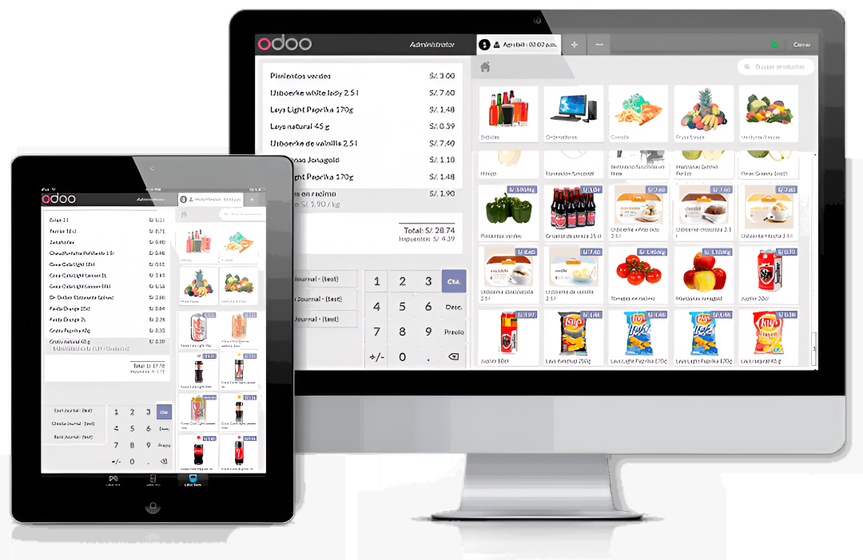
- Opening. Each branch opens a Point of Sale session at the start of the day.
- Selling. Each sale, return and discount is recorded at the till, with the payment method.
- Closing. When the cashier closes the session, Odoo posts the session’s accounting entries and stock moves. In other words, the books and branch stock are updated from the same transactions, without re-typing.
- Replenishing. Reordering rules and inter-branch transfers move stock where it’s needed, based on what actually sold.
Because every branch works in the same database, head office sees sales and stock for every location, and differences show up the same day rather than at the annual count. Our Odoo for retail page describes how multi-branch setups typically work.
What Owners See: Reports from the Same Data
When every flow runs through one database, reporting stops being a monthly project. Owners and managers can see, from the same data:
- Sales by product, branch and customer, without collecting files from each team.
- Stock value and movement by warehouse and location.
- Purchases against budget and open supplier bills.
- Production output and cost per order or product.
- Financial statements that reflect what actually happened in operations.
Just as important, everyone sees the same numbers. Arguments about whose spreadsheet is right are replaced by questions about what to do next.
What Odoo ERP Doesn’t Do on Its Own
Odoo is flexible, but it isn’t plug-and-play. Four things decide whether a project succeeds:
- Process design. Odoo can support many ways of working. Someone has to decide yours: approval steps, costing method, warehouse structure, branch rules.
- Clean data. Product codes, units of measure, bills of materials, opening stock and balances must be correct before go-live.
- Local requirements. Odoo includes an Egyptian chart of accounts and VAT setup. However, ETA e-invoicing and POS e-receipt connections depend on the version, edition and setup chosen. According to Basware’s Egypt compliance summary, VAT-registered companies must issue e-invoices through the tax authority’s portal, so this should be confirmed for your business before you commit, not assumed.
- Training and adoption. Storekeepers, cashiers and planners keep the data accurate. Short, practical training in Arabic makes the difference between a system that is used and one that is bypassed.
Getting Started: Choosing Apps and a Rollout Order
The modular design makes a phased rollout natural. A typical sequence for Egyptian factories and retail chains:
- Map your four flows. Document how orders, purchases, production and till sales work today, including who approves what.
- Start with Inventory, Purchase and Accounting. This fixes stock accuracy and supplier payments first.
- Add Sales, then Point of Sale or Manufacturing. Connect branches or the production line once the foundation is stable.
- Run one closing cycle in parallel. Compare Odoo’s numbers with the old process before switching off the old tools.
- Extend gradually. Add quality checks, maintenance or more advanced automation once the core is used daily.
For a fuller view of how an implementation project runs, read our Odoo ERP implementation guide for Egyptian businesses.
Frequently Asked Questions
What is Odoo ERP used for?
Odoo ERP is used to run sales, purchasing, inventory, manufacturing, point of sale and accounting on one shared database, so each transaction updates every department that depends on it.
Is Odoo ERP free?
Odoo Community is open source, while Odoo Enterprise is a paid edition with additional apps, features and official support. Total project cost also depends on implementation, setup, data migration and training, so compare the full scope rather than the licence alone.
Can Odoo ERP be used in Arabic?
Odoo can be used in Arabic. During setup, also confirm how invoices, receipts and reports should appear, for example in Arabic or bilingual layouts, since these depend on configuration.
Can Odoo handle multiple branches and warehouses?
Yes. Odoo supports multiple warehouses and locations, transfers between them, and Point of Sale for multiple branches, all in the same database.
Does Odoo ERP work for manufacturing?
Yes. The Manufacturing app covers bills of materials, manufacturing orders, work centers and production planning, and it connects to Inventory, Purchase and Accounting so production drives purchasing and cost.
Four Flows, One System
Odoo ERP earns its value in ordinary moments: when an order turns into a delivery and an invoice without re-typing, when a supplier is paid only for what arrived, when a production order records its true cost, and when a branch closes its till and the books update by themselves. For Egyptian factories and retail chains, those moments add up to fewer errors, faster closings and numbers everyone trusts.
PyramidBITS implements Odoo around how your branches, warehouses and production lines actually work, one stage at a time, with local support for your team.
Book a free demo with PyramidBITS and see these four flows running with your own products and processes.