Every HR team in Egypt knows the message. “Can I get an HR letter for the bank by tomorrow?” Then another for an embassy, then a salary details letter, then an experience certificate for someone who left last month. Each HR letter looks small, but together they eat hours every week, and every one carries your company’s name, stamp and figures.
This guide covers the eight letters Egyptian HR teams issue most, what each HR letter must include, a sample you can adapt, and how to move the whole process into Zoho People so employees request letters in a few clicks and HR approves instead of retyping.
What Is an HR Letter?
An HR letter is an official document your company issues to confirm facts about an employee: that they work for you, since when, in which role, and often what they earn. In Egypt, people usually mean one specific thing when they ask for “an HR letter”: a letter addressed to a bank, embassy or other organisation confirming employment and salary.
In practice, though, HR teams issue many kinds of letters across the employee lifecycle, from the offer letter on day one to the experience certificate on the last day. They all share three traits:
- They carry legal and financial weight. A bank approves a loan partly because of your HR letter.
- They repeat the same structure. Name, ID, title, joining date, salary, signatory.
- They are usually urgent. The employee needs it “by tomorrow” because the bank or visa centre appointment is fixed.
That combination, high stakes plus high repetition plus urgency, is exactly why manual letters go wrong.
The 8 HR Letters Egyptian Teams Issue Most
1. HR Letter for Banks
This is the most requested HR letter in Egypt. Employees need it for personal loans, credit cards, car loans and mortgage applications. Banks typically want the employee’s full name, national ID number, job title, hiring date, and monthly or annual salary, on company letterhead with a stamp and authorised signature. Some banks have their own required wording, so keep a version per bank if your employees use a few banks often.
2. HR Letter for Embassies and Visa Applications
When employees travel, the embassy usually wants proof that they have a stable job to return to. This HR letter normally confirms employment, salary, the approved leave dates and that the employee will resume work afterwards. Many visa centres also ask for it to be recent, so an old copy rarely works.
3. Salary Details Letter
Often called مفردات المرتب, this letter breaks the salary into its components: basic salary, allowances, and sometimes deductions such as social insurance and tax. Banks and some government entities ask for it alongside, or instead of, a general HR letter. Because it shows detailed figures, it needs tighter access control than a simple employment letter.
4. Employment Verification (“To Whom It May Concern”) Letter
A general letter confirming that the person works for you, in which role and since when, without naming a specific recipient. Employees use it for apartment rentals, school applications, club memberships and other everyday paperwork. It is the simplest HR letter to template, which makes it the best place to start automating.
5. Experience Certificate
Issued when an employee leaves, the experience certificate (شهادة خبرة) confirms the role, the period of employment and sometimes the main responsibilities. Former employees often request it months later, which means HR has to dig through old files to confirm dates and titles.
6. Offer and Appointment Letters
These start the relationship: the offer letter sets out the role and terms, and the appointment or confirmation letter formalises them. Because they go to candidates and new joiners, errors here damage your employer brand on day one.
7. Salary Revision and Promotion Letters
Every review cycle produces a batch of letters confirming new salaries, titles or grades. Issued one by one in Word, they take days, and a single copy-paste mistake can send the wrong figure to the wrong person.
8. Resignation Acceptance and Relieving Letters
When an employee resigns, they need written acceptance, the confirmed last working day and, later, a relieving or clearance letter. These letters tie into offboarding: final settlement, asset handover and access removal.

A Sample HR Letter You Can Adapt
Here is a simple structure for the most common case, an HR letter for a bank. Adjust the wording to match your company’s tone and the bank’s requirements.
[Company letterhead]
Date: [Date]
To: [Bank Name] – [Branch]
Subject: Employment and Salary Confirmation – [Employee Full Name]
We confirm that [Employee Full Name], national ID number [National ID], has been employed by [Company Name] since [Hiring Date] and currently holds the position of [Job Title] in the [Department] department.
The employee’s current gross monthly salary is EGP [Amount].
This letter has been issued at the employee’s request and does not constitute any financial guarantee by the company.
[Authorised Signatory Name] [Title] [Signature and company stamp]
Notice how every bracket is a field that already exists somewhere in your HR records. That is the key insight: an HR letter is not really writing. It is data, poured into a fixed format.
Why Manual HR Letters Keep Going Wrong
Most Egyptian companies still issue each HR letter the same way: an employee sends a WhatsApp message or email, someone in HR opens an old Word file, overwrites the name, checks the salary in a spreadsheet, prints, gets a signature, scans and sends. Here is where that breaks:
- Wrong data. The old file still shows the previous employee’s title, or last year’s salary. One wrong number on a bank letter creates real problems for the employee and for you.
- No approval trail. Who approved disclosing this salary to this bank? With manual letters, nobody can answer that a year later.
- Requests get lost. A request sent on WhatsApp to one HR officer disappears when that officer is on leave.
- HR becomes a typing pool. In a company of 150 people, even a few letter requests a day can consume a large part of one person’s week.
- Salary privacy leaks. Old Word files with salaries sit in shared folders and personal laptops.
The cost is not only time. It is accuracy, privacy and employee experience, all of which reflect on HR.
How to Automate HR Letters in Zoho People
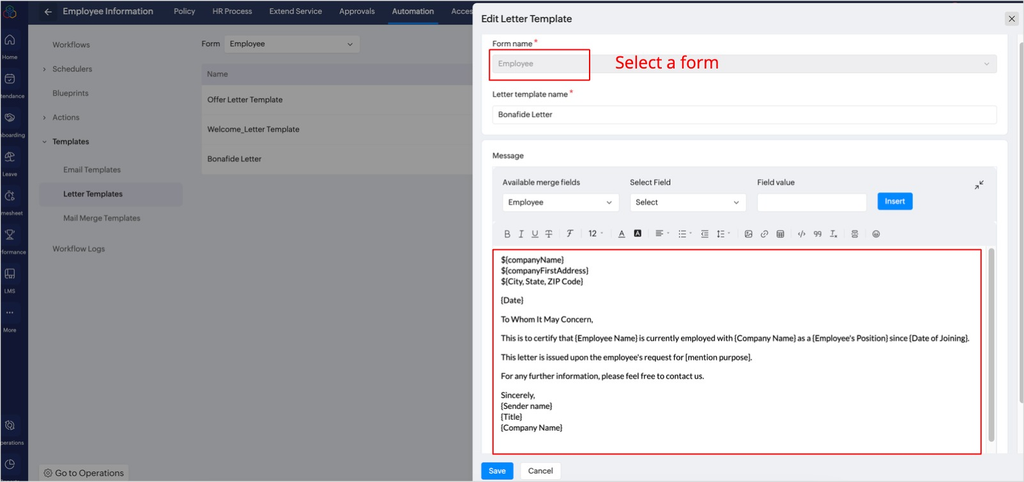
Zoho People is the core HR app in the Zoho HR suite, and it already holds the data every HR letter needs: employee profile, job title, department, joining date and any custom fields you add. Its letter features turn that data into documents.
Letter Templates with Placeholders
In Zoho People, you build each letter once as a template and insert employee fields as placeholders. Zoho’s documentation on letter templates explains that these templates can be used in workflow email alerts, downloaded from an employee’s record, or triggered from custom buttons. As a result, the name, ID, title and date are pulled from the record, not retyped.
Mail Merge for Batches
For letters you issue in batches, such as salary revision letters after a review cycle, Zoho People’s mail merge templates are built in Zoho Writer. According to Zoho’s mail merge guide, HR can select multiple employee records, merge them with one template, preview the results, and download the documents as PDF or DOCX or send them for e-signature. Zoho notes that mail merge uses credits, with a monthly allowance and add-ons available for higher volumes.
Request and Approval Workflow
This is where the real time saving happens. During implementation, a letter request form can be set up in the employee self-service portal: the employee picks the letter type, the recipient (for example, the bank name) and any notes. The request then goes through an approval flow, for instance to the HR officer, or to finance when salary figures are involved. Once approved, the letter is generated from the template. If you are new to self-service, our guide to employee self service in Zoho People shows how the portal works for leave, attendance and requests.
Document Storage and Access Control
Zoho People also acts as a central place for HR documents. Its document management features let you control who can see which documents by role, department or location, and support digital signature options. Consequently, salary letters stop living in shared folders and personal laptops.
A Note on Salary Figures
Salary letters need salary data. If your salaries are kept in Zoho People fields, the template pulls them directly. If they live in a separate payroll system, the implementation decides which salary fields are brought into Zoho People, who can see them, and which letter types are allowed to show them. This is a design decision, not a default, and it is worth getting right before the first letter goes out.
Setting Up Your HR Letter Process in 5 Steps
- List your letters and volumes. Pull the last three months of requests from email and WhatsApp. You will usually find that three or four letter types make up most of the volume.
- Standardize the wording. Agree on one approved version of each HR letter with management and, where needed, legal. Keep bank-specific versions only where banks insist.
- Clean the employee data. National IDs, titles, joining dates and salary fields must be correct, because every letter now depends on them.
- Define who approves what. A general employment letter may need only HR approval, while a salary details letter may also need finance. Write these rules down before you build them.
- Build, test and launch. Create the templates, test them with real records, train the HR team, then announce the request form to employees so requests stop arriving on WhatsApp.
What Changes for HR and Employees
Once the process runs in the system, the difference is visible quickly:
- Employees request letters themselves and track the status, instead of chasing someone on WhatsApp.
- HR reviews and approves, rather than copying, pasting and retyping figures.
- Managers see a clear record of which letters were issued, to whom and approved by whom.
- The company protects salary data and sends consistent, correctly formatted letters every time.
How PyramidBITS Helps
Templates are the easy part. The harder part is deciding which letters to standardize, which fields to trust, who approves salary disclosures, and how requests reach HR. PyramidBITS implements Zoho People around how your HR team actually works: we map your current letter types, set up templates and request forms, configure approvals and access, and train your team.
If you are also reviewing the rest of your HR operations, our overview of HR operations with the Zoho suite and our guide to the Zoho People leave management system are good next reads.
FAQs About HR Letters
What should an HR letter for a bank include?
Typically the employee’s full name, national ID number, job title, hiring date and salary, on company letterhead with the date, an authorised signature and the company stamp. Some banks have their own required wording, so confirm with the bank before issuing.
What is the difference between an HR letter and a salary details letter?
An HR letter usually confirms employment and states the salary as one figure. A salary details letter (مفردات المرتب) breaks the salary into components such as basic salary, allowances and deductions. Banks sometimes ask for both.
How long should it take to issue an HR letter?
With a manual process, anywhere from a day to several days, depending on who is available. With templates and an approval workflow, the letter can be generated as soon as the request is approved.
Can employees request HR letters through Zoho People?
Yes. A letter request form with an approval flow can be set up in the self-service portal during implementation, and the approved request is then turned into a letter from a template.
Can Zoho People send HR letters for e-signature?
Zoho People’s mail merge documents can be sent for signature once an e-sign integration is enabled, and Zoho People supports digital signature options for HR documents.
Stop Retyping Every HR Letter
Every HR letter your team retypes is time taken from hiring, engagement and the work that actually moves your company forward. Moving letters into Zoho People gives employees a faster answer and gives HR accurate, approved, consistent documents every time.
Book a free demo with PyramidBITS and see how your most common HR letter requests can run through Zoho People, from request to approved PDF.