Introduction: Why Effective Implementing Zoho CRM Matters
Looking for a comprehensive zoho crm implementation guide that actually delivers results? You’re not alone. Poised to surpass $112 billion in total sales this year and on track to reach nearly $262 billion in 2032, the worldwide CRM software market is expected to boom in the coming years. According to research, proper CRM deployment increases sales by 29%, employee productivity by 34% and customer satisfaction by 47%.
CRM market statistics show Zoho CRM powers over 250,000 businesses worldwide. “Enterprise-grade features without an enterprise-grade price tag.” But here’s the brutal truth: without a strategic implementation plan, your shiny new CRM system will be nothing more than a very expensive digital paperweight. If you want to unlock the full benefit of Zoho CRM and understand its true potential, this guide will take you through each critical step—from initial zoho crm overview to advanced configuration and optimization.
Comprehensive Guide to Zoho CRM Implementation Steps: From Planning to Launch
This Zoho CRM implementation guide breaks down the exact process that separates successful deployments from expensive failures. Before understanding the specifics of Zoho CRM implementation, know that implementation goes beyond technical setup—it is a business-wide transformation.
Here’s a high-level Zoho CRM overview of each key phase you need to master. For organizations managing multiple business systems in a complex environment, exploring centralized solutions, like using Zoho One to manage MSP business operations seamlessly, can provide crucial context for effective CRM integration and rollout.
- Phase 1: Strategic Preparation (Weeks 1-2)
- Define clear objectives: Are you solving for lead conversion, customer retention, reporting? Get this settled first.
- Assemble Your Implementation Team: At a minimum, you need a project champion, IT support and key departmental representatives.
- Audit existing processes – Document your current sales pipeline, service workflows and reporting needs before you even touch the software.
- Data Cleaning: Garbage in, garbage out. Clean up your lists, standardize fields and purge duplicates.
- Account Setup and Security Protocols: Implement necessary user accounts and define security measures.
- Field Customization – Adapt the standard CRM fields or create custom ones to fit your business needs. For advanced process design, understanding the ultimate guide to Zoho CRM blueprints can be essential to support automated workflows and scalable configuration as business needs evolve.
- Workflow Automation – Set up triggers, actions and approval steps to eliminate manual tasks. Organizations looking to accelerate marketing and lead nurturing should examine the technical nuances presented in the ultimate guide to Zoho marketing automation for an in-depth expansion of cross-platform workflows between CRM and marketing modules.
- Dashboard and Reporting Setup – Build the metrics that management will actually use to make decisions.
- Data Import Strategy: Map fields and execute a test import to ensure data integrity.
- Third-party Integrations: Seamlessly connect with tools like email marketing, accounting and e-commerce platforms. For businesses navigating emerging regulatory or data transparency challenges, there are new best practices involving integrating blockchain with Zoho apps to support secure workflow and data traceability within the CRM environment.
- Legacy System Decommissioning Plan: Establish a timeline for phasing out the old systems.
- User acceptance testing – Validate configurations with actual end-users before the full rollout.
- Training program execution: Conduct role-specific training sessions with practical exercises.
- Documentation development: SOPs, troubleshooting guides, quick reference materials.
- Phased Rollout Strategy: Implement the tool in stages, starting with pilot teams before a company-wide launch.
- Feedback collection mechanisms – Establish channels for users to report issues and provide suggestions. If your process improvement extends across departments like HR and finance, configure seamless HR/payroll integration by referencing Zoho Payroll integration with Zoho People to achieve digital transformation for HR.
- Performance monitoring – Track adoption, data quality and business KPIs.
- Continuous improvement plan – Establish a regular system review and enhancement cycle. Comprehensive performance involves optimizing customer touchpoints, where examining how Zoho CRM and Zoho Desk for customer service can work in tandem will highlight ways to boost ROI through improved support processes.
Critical Success Factors:
- Clean, reliable data from day one
- Full stakeholder buy-in upfront and ongoing
- Clear objectives and measurable success metrics
- Iterative feedback from end-users during configuration
- Robust user training and support
Common Pitfalls:
- Data Dumping: Importing unclean, unstructured records can cripple workflow automations and reporting.
- Scope Creep: Trying to implement everything at once rather than through a phased approach can paralyze progress.
- Ignoring Change Management: Failing to invest in communication and training often leads to poor adoption and wasted investment.
For complex deployments, engaging a zoho crm implementation partner is strongly recommended. Partners bring proven frameworks, deep platform expertise, and change management experience that can de-risk your rollout and accelerate ROI.
Detailed Timeline and Project Management Framework for Zoho CRM Implementation
Zoho CRM Implementation Guide: Timeline, Milestones, and Best Practices
This section of our Zoho CRM implementation guide focuses on project timelines and management strategies. The implementation process is complex, but for an average mid-sized business, it usually takes 6-12 weeks. Knowing what to expect at every phase is essential to project success. When implementation intersects with parallel business modernization—such as upgrading infrastructure—aligning project management with specialized tools, like Zoho Projects لتخطيط البنية التحتية الرقمية, enables more precise task ownership and cross-functional coordination.
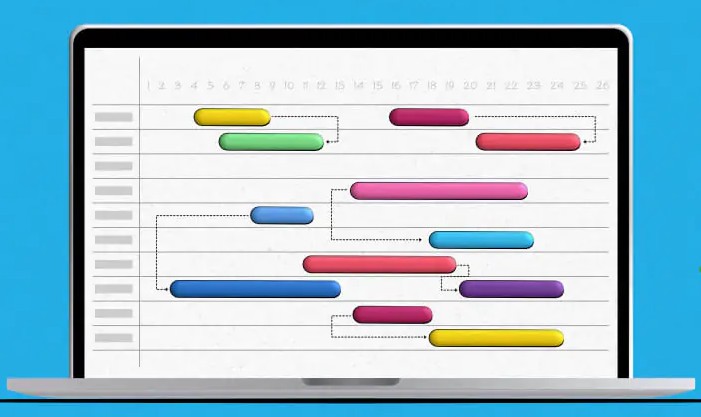
Implementation Timeline: Key Milestones and Deliverables
| Phase | Timeframe | Key Activities | Deliverables |
|---|---|---|---|
| Planning | Weeks 1-2 | Define project scope, Identify resources, Set goals | Project plan, Resource list |
| Discovery | Weeks 2-3 | Conduct needs analysis, Map current processes, Gap analysis | CRM requirements document |
| Design & Customization | Weeks 3-5 | Configure system settings, Customize fields, Develop integrations | Configured CRM prototype |
| Testing & Validation | Weeks 5-7 |
Unit testing of customizations, User acceptance testing (UAT) with sample data sets, Resolve issues identified during UAT sessions. Finalize configuration settings prior to full deployment. Prepare user training materials including manuals/videos etc. | Issue logs resolved |
| Training & Deployment | Weeks 8–10 | Train end-users on the new system functionality via instructor-led sessions or e-learning courses; | Trained users; Completed rollout |
Recommended Project Management Methodologies
- Agile: Ideal for iterative requirements and phased rollouts, allowing for feedback-driven refinements. For businesses needing to reinforce project controls with feature-tracking and methodical reporting, the possibilities detailed in Zoho Projects for Agile IT Transformation demonstrate scalable solutions for CRM-tied teams.
- Waterfall: Simple to manage and execute, particularly for less experienced teams; efficient in organizations where project approvals are difficult to obtain.
Best Practices for Communication and Change Management
- Weekly steering committee meetings (30 minutes)
- Bi-weekly project team meetings (1 hour)
- Monthly executive sponsor check-ins (15 minutes)
- Clear documentation of risks, issues, and action items
- Transparent progress reporting to stakeholders
Sample Role Assignments by Milestone
- Project Manager: Owns planning and resource allocation
- IT Lead: Handles technical configuration and integrations
- End-User Champion: Advocates for user adoption and feedback
Zoho CRM Implementation Guide: Cost Analysis and ROI Metrics
This section will help you calculate your return on investment by breaking down the cost structure of owning a CRM system. But ROI is not static; organizations that integrate their CRM with sales optimization strategies see much greater returns. To truly understand the levers driving ROI, it’s essential to examine how applying best practices to power up sales process with Zoho CRM impacts cost-efficiency, pipeline velocity, and ongoing value capture after implementation.

Comprehensive Cost Breakdown
| Cost Category | Description | Typical Range | Cost-Saving Tips |
|---|---|---|---|
| Software Licensing | Annual subscription fees based on features and users | $14-$52 per user/month | Start with basic editions; scale as needed |
| Implementation Services | Professional assistance for setup and customization | $5,000-$25,000 | Use internal teams or phased implementation |
| Internal Resource Allocation | Time spent by existing staff during setup | 100-300 person-hours | Ensure clear role definition |
| Data Migration | Moving current CRM data to the new system | $2,000-$10,000 | Pre-clean data to reduce costs |
Sample ROI Calculation Method
ROI = (Increased Revenue – Total Costs) ÷ Total Costs
Example: If your company invests $15,000 in implementation and licensing in the first year, but sees a $30,000 increase in sales due to improved CRM workflows, your ROI for Year 1 would be:
ROI = ($30,000 – $15,000) ÷ $15,000 = 1 or 100%
Recovery Timeline Example:
Month 1-2: Basic contact management and pipeline visibility
Month 3-4: Automation of repetitive tasks and reporting
Month 5-6: Advanced analytics and integration benefits
Zoho’s total ownership cost is 40-60% lower than Salesforce for comparable functionality because the company uses a proprietary infrastructure that reduces hosting and maintenance expenses CRM industry cost comparison.
For companies looking to maximize ROI and minimize the initial financial outlay, collaborating with an experienced Zoho CRM implementation partner ensures faster time-to-value by leveraging implementation best practices.
Technical Setup Guide with Visuals
Let’s break down the technicalities step by step so that you can set up your environment. While a Zoho CRM implementation partner can do this for you, here is a detailed guide to help you understand the technical aspect of this process. For recruitment-centric organizations or HR teams aiming to streamline hiring pipelines, you may want to reference integrated workflow models such as those outlined for hiring processes with Zoho Recruit ATS, which demonstrate how recruitment, onboarding, and system permissions can be unified within the CRM platform.
- Account Setup and Security Configuration
- Create your Zoho account – Go to zoho.com/crm and click “Free Sign Up”
- Enter your company details and verify the email address
- Enable multi-factor authentication for the admin account
- Data Structure and Field Customization
- Module Customization: Standard modules such as Leads, Contacts and Accounts can be adapted for your terminology. Create custom modules to track industry-specific entities. Page layouts may be configured based on user roles.
- Field Configuration:
- Standard Fields: Tweak to align with your business processes.
- Custom Fields: Set up new fields along with their validation rules.
- Dependent Fields: Establish dependencies to streamline data entry.
- Record Types and Business Rules: Define different record types (if needed), create validation rules, ensure field-level security in modules where necessary.
- Data Migration and Import
- Clean the source data (remove duplicates, ensure consistency in formats).
- Test Migration:
- Select 50-100 records for sample import.
- Verify field mapping and data relationships. When handling intricate candidate data or bulk applications, aligning processes with those detailed in Zoho Recruit ATS hiring process automation can dramatically reduce risk and data mismatches.
- Modify the import template as necessary based on results.
- Run full import (during off-hours) in the correct order (accounts, contacts, opportunities etc).
- Automation & AI Configuration
- Set up workflow rules: email alerts, task creation, field updates, conditional actions with Zoho Flow
- Train and customize Zoho’s AI assistant (Zia) for accurate predictions, lead scoring, and anomaly detection. The intricate steps in workflow automation are thoroughly dissected in the ultimate guide to Zoho CRM blueprints for automation, revealing how to craft scalable, error-proof processes across large teams.
- Email Integration & External Connections
- Set up email templates and tracking
- Configure mailbox for email conversations
- Define rules for email-to-record processing
- Integrate website forms to capture leads, implement web tracking, assign leads automatically
- Connect third-party applications:
- Accounting software (e.g., Xero)
- Marketing tools (e.g., HubSpot)
- E-commerce (e.g., Magento)
Security and Backup Best Practices
- Establish user roles with least privilege
- Schedule daily backups
- Enable audit logging
Common Technical Issues and Solutions
| Issue | Solution |
|---|---|
| System is slow | Check custom fields number, report optimization, automation complexity |
| Data import does not work | See if field types match, all required fields are present, character limits |
| Emails are not tracked | Make sure tracking code is installed, domain authenticated, required permissions |
| Integration is not synchronizing | Verify API credentials, field mappings, and error logs. If project deliverables rely on data flow between CRM and the project suite, reviewing strategies found in Zoho Projects integration for project delivery becomes indispensable for resolving multi-system sync issues. |
| Automations do not trigger | Check criteria conditions and rule activation |
For technical roadblocks beyond your team’s scope, don’t hesitate to bring in a Zoho CRM implementation partner—their experience can mean the difference between smooth sailing and implementation gridlock.
Zoho CRM Implementation Guide: Industry Specifics
Different industries have unique CRM implementation requirements. This section of our Zoho CRM implementation guide offers valuable recommendations for three markets, weaving in relevant secondary keywords like zoho crm how to use and insights from industry specialists. For industries seeking to build powerful knowledge bases or integrated customer support channels, it is worth examining case-specific implementations, such as those achieved by Zoho CRM and Zoho Desk for customer service excellence.
Retail and E-Commerce Implementation Strategy
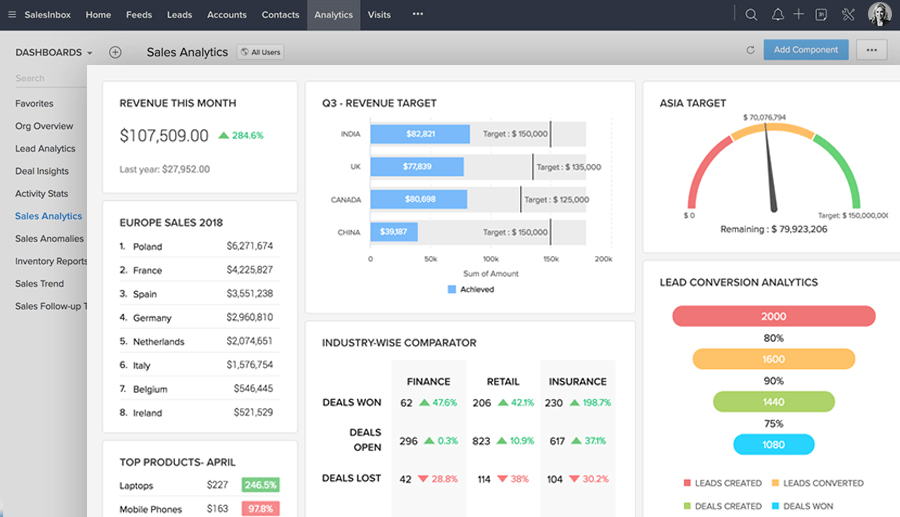
- Key Challenges:
- Tracking and synchronizing customer journeys across multiple channels
- Integrating the inventory system with the sales pipeline
- Automating post-purchase follow-ups
- Connecting loyalty programs to marketing campaigns
- Recommended Configuration:
- Custom Modules:
- Product Catalog (with inventory levels)
- Order Management (fulfillment status)
- Customer Loyalty (points tracking)
- Return/Exchange Processing
- Integrations:
- E-commerce platform (Shopify, WooCommerce)
- Inventory management system
- Payment processing
- Shipping and logistics
- Automations:
- Abandoned cart reminders
- Post-purchase feedback requests
- Reorder notifications
- VIP customer acknowledgments
- Key Performance Indicators:
- 60% of users witnessed higher sales productivity (Zoho CRM user statistics)
- 40% observed a 20% enhancement in customer satisfaction (Zoho CRM user statistics)
- Decrease in cart abandonment by 15%
- Increase in repeat purchases by 22%
- Custom Modules:
Professional Services Implementation Strategy
- Challenges:
- Tracking project engagements and delivering on time
- Time tracking and billing coordination
- Resource utilization clarity
- Client relationship oversight. To better orchestrate resource allocation and delivery milestones, leveraging details from enterprise project management with Zoho Projects provides the missing operational layer for service-based CRM deployments.
- System Setup Suggestions:
- Projects (Milestones)
- Deliverables (Approvals)
- Resource Allocation (Utilization)
- Client Success (Health Score)
- Integrations:
- Project Management (Zoho Projects, Asana)
- Time Tracking and Billing
- Document Management
- Professional Services Automation (PSA)
- Automation Workflows:
- Project milestone alerts
- Resource availability notifications
- Client communication sequences
- Periodic satisfaction assessments
- Success Metrics:
- 35% better resource utilization
- 28% less time on project administration
- 40% speedier client onboarding
- 25% rise in referral business
Real Estate Implementation Strategy
- Key Challenges:
- Property inventory management
- Client preference alignment
- Transaction progress tracking
- Agent performance evaluation
- Recommended Configuration:
- Properties (detailed information, status tracking)
- Deals (key milestones, status)
- Client Needs (matching algorithm)
- Commissions
- Integrations:
- MLS listing services
- Document signing tools
- Property marketing systems
- Mortgage calculators and services
Industry-Agnostic Best Practices
- Start with Core Processes First – Focus on implementing core workflows and processes first rather than attempting to automate everything at once.
- Prioritize user experience: Layouts and fields should be customized to fit the way users work.
- Build for Scalability – Build with growth in mind. Set up naming conventions and folder structures that can be scaled.
- Focus on adoption drivers – Identify features that need to be implemented so as to drive end user acceptance and ensure they are properly emphasized.
- Consider Specialized Expertise: When implementing industry-specific configurations, a zoho implementation partner with sector experience can dramatically accelerate time-to-value. In cases where HR, payroll, and CRM are converging for digital transformation, exploiting the seamless integration described in تكامل Zoho People مع Zoho Payroll provides models for other sectors to emulate.
Zoho CRM vs Competing CRM Solutions: Implementation Comparison Table
Which naturally translates to the benefits of implementing Zoho CRM. The below table provides an implementation comparison of leading CRM platforms, supporting your zoho crm implementation guide research. For a complete CRM support ecosystem, organizations delivering multi-channel customer service can deepen their understanding through the operational synergy between Zoho CRM and Zoho Desk as illustrated in complex service-driven rollouts.
| Feature | Zoho CRM | Salesforce | HubSpot | MS Dynamics | Pipedrive |
|---|---|---|---|---|---|
| Avg. Implementation | 6–12 weeks | 10–16 weeks | 4–8 weeks | 12–20 weeks | 2–6 weeks |
| Cost (Startup) | $$ | $$$$ | $$ | $$$$ | $ |
| Customization | High | Very High | Moderate | Very High | Moderate |
| Support/Partners | Global partners | Extensive | Email/Chat | Extensive | |
| Notable Advantage | Value, Ecosystem | Enterprise | Simplicity | Integrations | Speed |
Key Advantages Unique to Zoho CRM:
- Faster onboarding and time-to-value with a global support partner network
- Lower total cost of ownership without sacrificing customization or integration capacity. For companies scaling across HR and operations, frameworks for integrating Zoho People and Payroll modules expand Zoho’s appeal beyond classic CRM.
Case Studies: Real-World Zoho CRM Implementations with Metrics

The true test of any implementation guide lies in the real-world results it delivers. These examples show the significant impact CRM systems can have when effectively implemented. Many organizations realize additional benefits by extending CRM data to project management or resource scheduling. Practical insights for project-driven outcomes and real-time collaboration are explored through Zoho Projects infrastructure planning integration.
Case Study 1: E-Commerce Retailer Transforms Customer Experience
- Company Profile: Online fashion retailer with 50,000+ SKUs and 15 customer service representatives
- Implementation Challenges:
- Fragmented customer data across multiple platforms
- No visibility into customer purchase history during support calls
- Manual order status lookup creating long response times
- Limited ability to identify and reward high-value customers
- Implementation Approach: Working with a certified Zoho CRM implementation partner, the company deployed a phased implementation over 8 weeks:
- Phase 1: Core CRM setup and data migration
- Phase 2: E-commerce platform integration
- Phase 3: Customer service workflow automation
- Phase 4: Loyalty program integration and VIP workflows
- Key Customizations:
- Custom modules for one-click order lookup, customer profiles and purchase history, automated post-purchase follow-up, and loyalty status tracking.
- Results:
- Average customer response times reduced by >30%
- Customer satisfaction survey NPS increased from 58 to 71 in one quarter
- Repeat purchase rate up by 22%
- Testimonial:
What used to take several systems and manual research is now automatic and seamless, granting the team full visibility into customers. The payoff has been immense.
– Operations Director
Case Study 2: Professional Services Firm Streamlines Client Management
- Company Profile: Consulting firm with 75 consultants across three service lines
- Implementation Challenges:
- Inconsistent client communication practices
- Poor visibility into project profitability
- Manual resource allocation creating inefficiencies
- Limited cross-selling between service lines
- Implementation Approach: The 10-week implementation focused on:
- Unified client database with relationship mapping
- Project management integration with time tracking
- Automated client communication workflows
- Cross-service opportunity identification
- Key Customizations:
- Client health scoring algorithm
- Project milestone tracking with automated alerts. If you oversee professional services with parallel project delivery, process efficiency can leap forward by integrating Zoho Projects for milestone management and client tracking directly into your CRM workflow.
- Resource utilization dashboards
- Service line cross-selling recommendations
- Measurable Results:
- 32% increase in consultant utilization rates
- 45% reduction in administrative time spent on client reporting
- Testimonial:
We now have one single source of truth for client relationships and project status. This automation allows Armanino’s consultants to spend more time on what matters most—serving clients, not updating systems.
Case Study 3: Real Estate Agency Boosts Agent Productivity
- Challenges: Disjointed legacy system, slow matching of clients to properties, lack of visibility into deal progress.
- Solution Highlights:
- Agent dashboards with pipeline automation
- Client intake forms and matching logic
- MLS and document automation integration through a Zoho CRM implementation partner
- Results:
- 35% faster matching of clients to properties
- 98% agent adoption rate within 45 days
- 15% increase in monthly deals closed. Agencies that handle end-to-end deal management will also benefit from the playbooks exemplified in Zoho CRM and Zoho Desk for customer-facing teams—connecting property data with real-time support and agent analytics.
- Testimonial:
We built exactly what our agents needed, not what some software company thought we should have. Thanks to the implementation partner’s industry expertise, our business processes were seamlessly translated into the system setup.
– Brokerage Owner
These case studies show that successful Zoho CRM implementation requires more than just technical setup—it takes business process understanding, user involvement, and the right expert help when needed. Where advanced digital infrastructure is critical, businesses increasingly turn to insights offered by Zoho Projects infrastructure planning for scalable workflows.
Q&A: Addressing Common Zoho CRM Implementation Challenges
Every system implementation has its hurdles. This section of the Zoho CRM implementation guide focuses on common challenges organizations face when setting up the system. To further close the gap between CRM adoption and communication excellence, strategies mapped in the ultimate guide to Zoho marketing automation can illuminate advanced approaches to integrating sales, marketing, and service touchpoints from day one.
Q1: How can we ensure user adoption after implementation?
- Involve Users Early: Include representatives from each department in the system’s requirements gathering and testing phases.
- Focus on “What’s in it for me.” Show how CRM will save them time and solve their daily pain points.
- Provide Role-Based Training: Focus training sessions on users’ specific roles rather than just system features.
- Implement gradually: Start with basic functionality and as users get comfortable, introduce more advanced features.
- Measure and recognize adoption: Track usage metrics and publicly celebrate power users. As new users onboard, immersive approaches drawn from integrated blueprints—for example, the ultimate guide to Zoho CRM blueprints for scalable onboarding—help establish adoption as an ingrained, not incidental, practice.
Remember, adoption is an ongoing process, not a one-time event. Plan for refresher training and regular system enhancements.
Q2: What is the best way to migrate data from our current systems?
- Audit and Clean the Source Data First: Remove duplicate records, standardize formats and fill in missing information. For organizations handling complex or multilingual data sets, referencing specialized workflows—such as candidate data migration in Zoho Recruit ATS—unveils tactics to safeguard data quality during import.
- Develop a detailed mapping document: Ensure field-to-field data mapping between source and destination systems is thoroughly documented.
- Test with sample data: Migrate a small subset of the data (e.g., 100-200 records) to identify potential issues.
- Establish Validation Criteria: Define quantitative measures of success (e.g., “99.9% of records successfully transferred with all required fields”).
- Create a rollback plan: Always have a backup plan in case the migration needs to be reversed.
For highly complex migrations (e.g., from multiple legacy systems or custom databases), a specialized Zoho CRM implementation partner may be required.
Q3: How do we handle customization without creating a maintenance nightmare?
- Leverage out-of-box functionality first: Use standard features and adapt processes before considering customization.
- Document all customizations: Keep a detailed log of all fields, workflows and code.
- Use configuration over code: Point-and-click tools should be prioritized over custom code where possible.
- Implement governance: Set up a change control board for enhancement requests.
- Plan for upgrades: Anticipate adjustments when Zoho updates its platform. Complex customizations often benefit from one holistic workflow perspective; explore integrating blockchain with Zoho apps for data integrity enforcement as a model for future-proof, manageable custom functions.
The most sustainable model is the “80/20 balance”: 80% standard capabilities, 20% customizations for differentiation.
Q4: What integration challenges should we anticipate?
- API limitations: Some platforms restrict API access, which can limit integrations.
- Authentication Management: Handle API credential security and OAuth token refreshes carefully. Cross-tool integrations are most stable when referencing patterns like those highlighted for Zoho CRM and Zoho Desk unified support workflows.
- Data synchronization conflicts: Specify your “system of record.”
- Error Handling: Put notification and recovery mechanisms in place for integration failures.
Q5: How do we measure implementation success beyond go-live?
- User adoption rate: Percentage of users actively logging in/performing key actions daily or weekly.
- Data quality metrics: Completeness, accuracy, and timeliness of critical fields.
- Process efficiency gains: Workflow time saved compared to before. Teams incorporating sophisticated marketing automation, as detailed in the ultimate guide to Zoho marketing automation for ROI measurement, often unlock latent CRM performance increases post-launch.
- Business outcome improvements: Increased conversion, satisfaction, or revenue.
Establish a 30-60-90 day post-launch review rhythm to track these metrics and address any issues before they become ingrained. For companies that do not have an expert in-house team, finding a reliable Zoho CRM implementation partner for post-launch optimization is essential.
Interactive Zoho CRM Implementation Checklist/Roadmap

For a more detailed phase-by-phase implementation plan (with the timelines and responsibilities), download our interactive Zoho CRM implementation guide roadmap. This resource outlines every critical phase, the owners responsible, estimated durations, and key deliverables. Product and service businesses aiming to create actionably connected checklists can also find inspiration from multidimensional workflows as described in the ultimate guide to Zoho marketing automation for implementation management.
- Configure user profiles, roles, and access settings
- Document process maps for key workflows
- Schedule milestone-based reviews
- Design adoption measurement dashboards
- Assign training and feedback sessions. Companies building holistic delivery systems should also explore Zoho CRM and Zoho Desk integrated training tools for ongoing enablement and feedback loops.
Recommended format: Downloadable PDF, Excel, or embeddable web checklist for easy reference and team collaboration.
References
- Zoho CRM User Statistics and Adoption Rates
- CRM Market Insights for 2025
- CRM Consulting Market Insights
- CRM Industry Cost Comparison (CX Today)
- CRM Industry Market Statistics (Digital Silk)
- Zoho CRM vs Salesforce Comparison (Digital Socius)
- Leading SaaS CRM Companies Data
- CRM Statistics and Predictions (Cirrus Insight)
- Zoho CRM Features Overview