
Introduction
By October, most sales leaders are asking the same question: the pipeline looks full, so why isn’t revenue moving faster? Sales velocity answers it. Sales velocity measures how much revenue your pipeline generates in a given period, and it combines four numbers your CRM already holds. Improve any one of them and revenue speeds up, without a single extra lead.
This guide explains the sales velocity formula, walks through a worked example with real arithmetic, and shows the four levers that move the number. It also covers where to track sales velocity in Zoho CRM and the measurement mistakes that make the number lie.
What Is Sales Velocity?
Sales velocity is the speed at which your open opportunities turn into revenue. It is also called pipeline velocity, and the sales velocity formula is:
Sales velocity = (number of opportunities × average deal size × win rate) ÷ sales cycle length
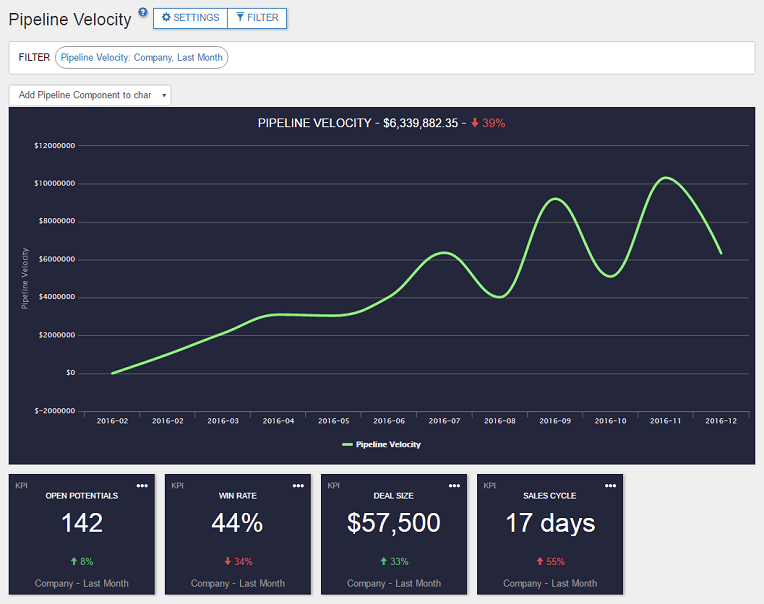
Zoho uses the same four inputs. Its Pipeline Velocity dashboard multiplies them and adds a 30-day factor, so the result reads as revenue per 30 days. The four inputs are:
- Opportunities: open, qualified deals in the period
- Average deal size: the average value of won deals
- Win rate: the share of closed deals you actually win
- Sales cycle length: the average days a won deal takes from creation to close
Three inputs sit above the line and one sits below it. That detail matters, because every day you remove from the cycle lifts sales velocity as much as growing the pipeline does.
Calculate Your Sales Velocity: A Worked Example
The numbers below are illustrative. Say a team has 40 open qualified opportunities, a 25% win rate, an average deal of EGP 200,000 and a 90-day cycle:
40 × 0.25 × 200,000 × 30 ÷ 90 = EGP 666,667 per 30 days
Now change one input at a time:
| Scenario | Change | Sales velocity (EGP per 30 days) | Lift |
|---|---|---|---|
| Baseline | — | 666,667 | — |
| More opportunities | 40 → 48 | 800,000 | +20% |
| Higher win rate | 25% → 30% | 800,000 | +20% |
| Larger deals | 200,000 → 240,000 | 800,000 | +20% |
| Shorter cycle | 90 → 75 days | 800,000 | +20% |
| All four, about 10% each | 44 opps, 27.5%, 220,000, 81 days | 985,926 | +48% |
Two lessons come out of the table. Cutting 15 days from a 90-day cycle is worth exactly as much as adding 20% more opportunities, and it uses deals you already have. And small gains compound: a 10% improvement on each lever lifts sales velocity by almost 48%.
How to Improve Sales Velocity: The Four Levers
Lever 1: Work More Qualified Opportunities, Not More Leads
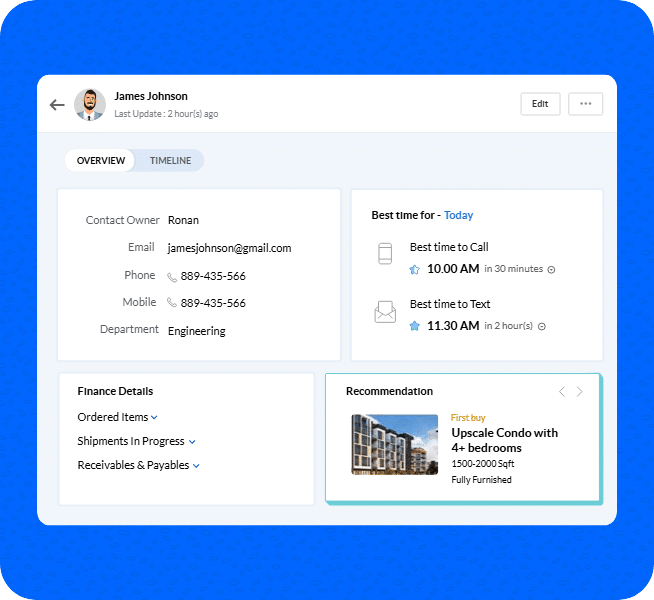
Sales velocity counts qualified opportunities, not raw leads. A lead that never becomes an opportunity adds noise, not velocity. The fix is better sorting: score leads so reps spend their time on deals that fit your buyer profile. Zoho’s Zia helps here by predicting win probability and suggesting the best time to contact a lead. Zia sorts the list; your reps still do the selling. Our Zoho CRM marketing automation guide covers how lead scoring connects to campaign data.
Lever 2: Protect Your Win Rate From Stale Deals
Here is a detail most teams miss. In Zoho’s Pipeline Velocity dashboard, win rate is won deals divided by closed deals plus overdue records plus old records. That means open deals sitting past their expected close date quietly pull your win rate down.
A pipeline full of zombie deals is therefore a win-rate problem, not just a tidiness problem. Review open deals monthly, reset unrealistic closing dates, and close out the dead ones. Your win rate will rise without a single extra sale.
Lever 3: Grow Average Deal Size
Deal size is the most direct lever and the easiest to ignore. Pull your largest won deals from the last two quarters and compare them with the median. Look at what the big ones had in common: the product mix, the seniority of the stakeholder, the timing of the proposal. Then build those patterns into your qualification questions so reps look for them earlier. Always measure deal size by segment, because averaging large and small accounts together hides what is working.
Lever 4: Shorten the Sales Cycle
The cycle is the denominator, so it is the lever with the most leverage. It is also getting harder to shorten. Gartner’s May 2025 survey of 632 B2B buyers found that buying groups now range from five to 16 people across as many as four functions, and that 74% of buyer teams show unhealthy conflict during the decision. Groups that reach consensus were 2.5 times more likely to report a high-quality deal.
The practical reading for sellers is simple: cycles stretch when only one or two contacts are engaged. Add every stakeholder to the deal record, send consistent materials to all of them, and watch for stalls.
Deal aging alerts surface opportunities that are slowing down before they become unrecoverable, a problem we cover in why B2B deals stall. Requiring a clear next step at each stage through Zoho CRM Blueprints keeps momentum visible. For long, multi-stakeholder cycles in particular, see our guide to Zoho CRM for B2B sales.
Track Sales Velocity in Zoho CRM
Zoho gives you two places to measure the inputs:
- Pipeline Velocity dashboard. It lives in Zoho Motivator, part of Zoho CRM Plus. It shows open potentials, win rate, deal size and sales cycle length, flags a trending-down KPI in red, and lets you drill into a trend chart. The same documentation shows how to launch a sales contest straight from the win-rate KPI.
- Sales Metrics reports. Zoho’s Sales Metrics reports cover lead conversion duration, sales cycle duration (including across owners) and overall sales duration, which gives you the cycle-length input and a view of which reps close fastest.

An honest limit: the dashboard above sits in Motivator, so check your Zoho edition before building a weekly routine around it. If you don’t have it, the same four inputs can be built from standard reports. Our advanced analytics guide shows what reporting is possible once the data lives in one system.
Run a Monthly Sales Velocity Review
Measuring sales velocity once is a diagnosis. Reviewing it monthly is a habit that actually changes revenue. A simple routine takes under an hour:
- Pull the four inputs for each segment, such as new versus existing business or large versus small deals, not one blended number.
- Compare each input with the trailing quarter and find the one that slipped furthest.
- Assign one owner and one action to that input for the next 30 days, for example closing out every deal past its expected close date.
- Re-measure at the next review and keep the change only if the number moved.
The discipline matters more than the tool. Fixing one weak input per month is easier to sustain than a big annual overhaul, and because each lever lifts sales velocity on its own, every fix shows up in the next review.
Four Mistakes That Make Your Sales Velocity Number Lie
- Mixing deal types. New business and existing accounts have different cycles. Zoho’s own reports note that cycle length varies by deal size, rep and type of business, so segment before you average.
- Counting lost deals in cycle length. Zoho’s dashboard measures cycle length on won deals only. Lost deals tell a different story and belong in the win rate, not the cycle.
- Judging a long cycle on a short window. A 30-day snapshot of a 120-day cycle is noisy. Compare rolling quarters instead.
- Trusting inconsistent stage data. If reps define stages differently, every input is a guess. Agree the stage definitions first.

Frequently Asked Questions
What is the sales velocity formula?
Sales velocity equals the number of opportunities times average deal size times win rate, divided by sales cycle length. Zoho’s version multiplies by 30 days so the result shows revenue per month.
Is sales velocity the same as pipeline velocity?
Yes, in practice. Both describe how fast revenue moves through the pipeline. Zoho’s dashboard is named Pipeline Velocity and uses the same four inputs.
What is a good sales velocity?
There is no universal benchmark, because deal size and cycle length differ so much between businesses. Compare against your own trend, by segment, quarter over quarter.
Which lever should I improve first?
Start with the weakest input compared with your own history. Cycle length is often the cheapest to fix because it works on deals you already have.
Can Zoho CRM calculate sales velocity automatically?
Yes. The Pipeline Velocity dashboard in Zoho Motivator calculates it from your pipeline data, and Zoho CRM’s Sales Metrics reports cover the cycle-length inputs. Availability depends on your Zoho edition.
See Your Own Sales Velocity in Zoho CRM
If you can’t say today which of the four inputs is holding your revenue back, that’s the first thing to fix before the next quarter’s targets are set.
Book a free demo with PyramidBITS and see your sales velocity calculated on a live Zoho CRM pipeline.