Introduction
Business email is still one of the most important tools for any company. It gives your team a professional identity, keeps communication organized, and helps employees communicate with clients, suppliers, partners, and internal teams using a trusted company domain.
But business email alone is no longer enough.
Modern teams do not only send and receive messages. They share files, edit documents, attend meetings, manage calendars, follow up on internal tasks, collaborate across departments, and work from different locations. When each of these activities happens through a different tool, daily work becomes scattered.
For many Egyptian companies, the workplace setup looks like this: email from one provider, files in another platform, meetings through a separate app, documents edited in a different system, internal chat on WhatsApp, and calendars that are not always connected. This may work for a small team, but as the business grows, it creates delays, confusion, and unnecessary subscription costs.
This is where a full workplace productivity suite becomes more valuable than email alone.
Zoho Workplace, including Zoho Mail, gives businesses a connected ecosystem for email, files, documents, meetings, chat, and calendar. Instead of managing collaboration through separate tools, teams can work from one integrated environment.
For Egyptian SMEs looking for a better way to manage business email Egypt needs and team collaboration, Zoho Workplace Standard can be a practical, cost-effective option.
Why Business Email Still Matters
Business email remains essential because it gives the company a professional communication channel.
A company email address using your domain looks more credible than personal email accounts. It also gives the business better control over users, access, and communication history.
Business email helps companies:
- Communicate professionally with clients
- Keep employees under one company domain
- Manage user accounts centrally
- Separate business communication from personal accounts
- Create department emails such as sales, support, finance, or HR
- Improve trust in proposals, invoices, and official messages
For many companies searching for business email Egypt solutions, this is the starting point. They need proper email for the team. But once the team starts working together daily, email becomes only one part of the workflow.
The problem begins when everything outside email is handled through separate tools.
The Problem with an Email-Only Setup
An email-only setup forces teams to use workarounds.
A manager sends a file by email. Someone downloads it, edits it, sends it back, and another version appears. A meeting is scheduled through a separate calendar tool. The meeting link comes from another platform. Notes are written in a document stored somewhere else. Internal comments happen through WhatsApp. The final file is uploaded to a shared drive that not everyone can access.
The result is scattered work.
Teams lose time asking questions like:
- Where is the latest version of the file?
- Who has access to this folder?
- Did we send the meeting invite?
- Was the document updated?
- Where are the meeting notes?
- Did the team discuss this in email or chat?
- Is this the final version or an old copy?
This is not just annoying. It affects productivity, accuracy, and accountability. Email is important, but it was not built to manage the full collaboration flow of a growing team.
Why Teams Need More Than Email
A modern team needs connected tools that support how work actually happens.
Work usually moves between communication, files, meetings, documents, calendar, and follow-up.
For example, a sales proposal may start with an email from a client. The team then needs to prepare a document, review pricing in a spreadsheet, store supporting files, schedule a meeting, discuss internal notes, and send the final version.
If every step happens in a separate tool, the process becomes fragmented.
A full workplace productivity suite connects these steps.
Instead of email being the only center of work, the team has one ecosystem where communication and collaboration support each other.
This is why businesses are moving from “we need email” to “we need a workplace suite.”
What Is a Workplace Productivity Suite?
A workplace productivity suite is a group of connected tools that help teams communicate, collaborate, store information, and manage daily work.
A complete suite usually includes:
- Business email
- Calendar
- Cloud file storage
- Document editor
- Spreadsheet editor
- Presentation tool
- Online meetings
- Team chat
- Admin controls
- Mobile access
The key word is connected.
A workplace suite is not just a bundle of apps. It should help the team move smoothly between tasks without constantly switching platforms, duplicating files, or losing context.
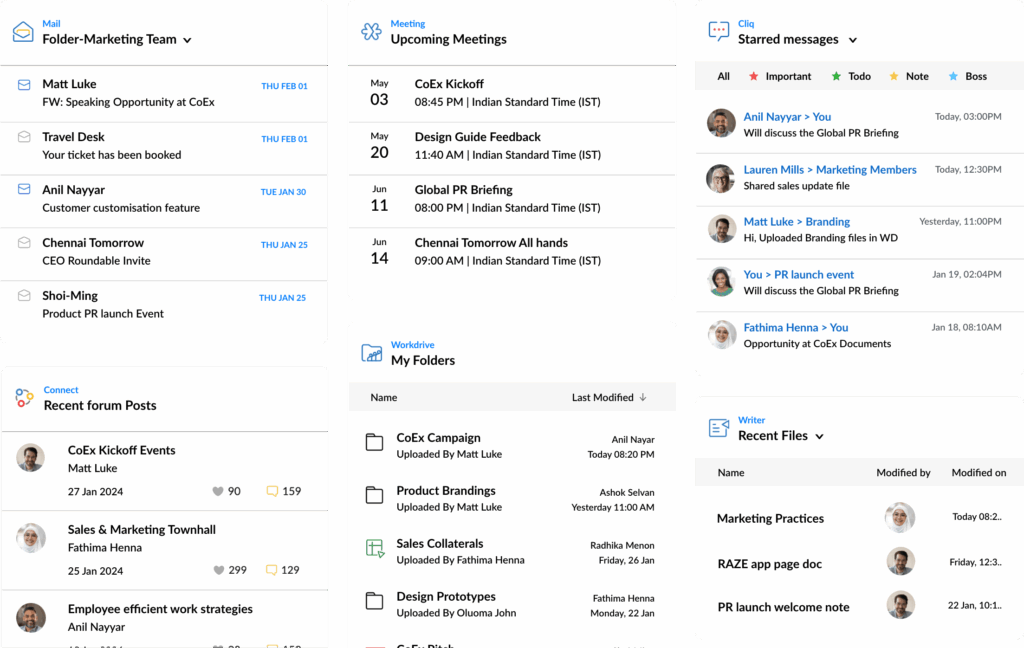
Zoho Workplace is built around this idea. It brings email, file storage, documents, spreadsheets, presentations, meetings, chat, and calendar into one connected workplace ecosystem.
Zoho Mail: Professional Business Email for Your Team
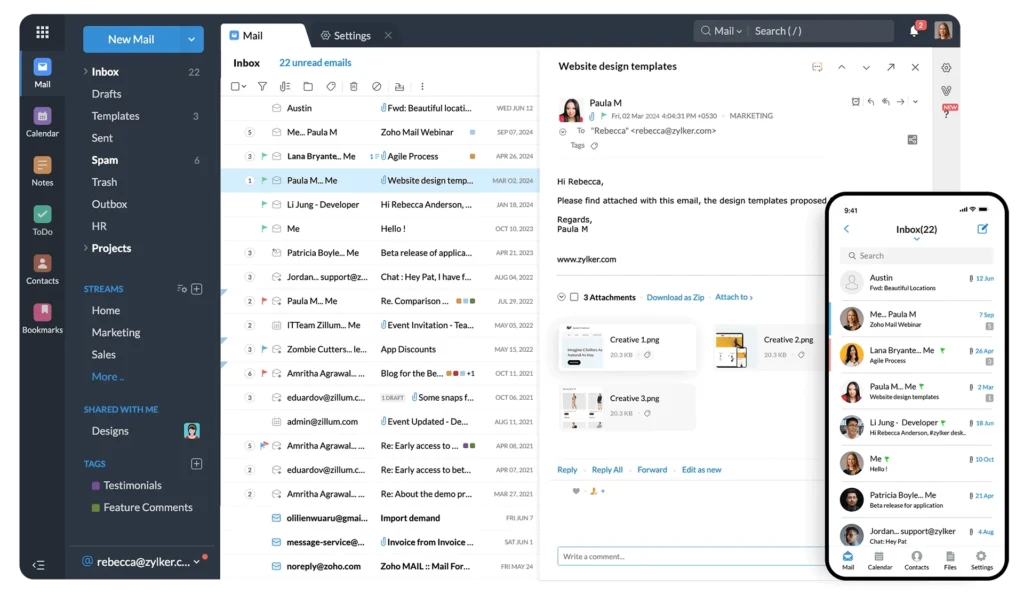
Zoho Mail is the email foundation inside Zoho Workplace.
It gives businesses professional domain-based email with admin control, user management, and a clean email experience for teams.
With Zoho Mail, companies can manage:
- Company email domains
- User mailboxes
- Group email addresses
- Admin settings
- Email access control
- Calendar integration
- Mobile email access
For Egyptian businesses, Zoho Mail is especially useful when they need business email that is professional, reliable, and part of a wider collaboration setup.
But the real value appears when Zoho Mail is used as part of Zoho Workplace, not as a standalone inbox.
An email can lead to a meeting, a file, a shared document, a calendar event, or an internal chat. When these tools are in one ecosystem, the team works with less friction.
Zoho Workplace: What Teams Get Beyond Email
Zoho Workplace gives teams more than business email. It helps companies manage the daily work that happens around email.
Depending on the plan and setup, Zoho Workplace can include tools such as:
- Zoho Mail for business email
- Zoho Calendar for scheduling
- Zoho WorkDrive for shared file storage
- Zoho Writer for documents
- Zoho Sheet for spreadsheets
- Zoho Show for presentations
- Zoho Meeting for online meetings
- Zoho Cliq for internal chat
- Admin controls for users and access
This matters because most teams do not only need an inbox, they need a complete working environment.
Zoho Workplace can be a practical option for Egyptian SMEs that need email, files, meetings, and documents without depending on too many disconnected subscriptions.
Files: Why Shared Storage Should Not Be Random
File storage becomes a serious issue as teams grow. In many companies, files are scattered across personal drives, email attachments, WhatsApp messages, local devices, and shared folders with unclear permissions.
This creates several problems:
- Employees cannot find the latest file.
- Sensitive files may be shared with the wrong people.
- Old versions keep circulating.
- New employees do not know where documents are stored.
- Managers lose visibility over team folders.
Zoho WorkDrive helps businesses create shared team storage as part of Zoho Workplace.
Instead of sending files back and forth by email, teams can store, organize, share, and collaborate on files in one controlled environment.
This improves document control and reduces confusion around file ownership and access.
Documents, Sheets, and Presentations: Collaboration Without Version Chaos

Documents are part of almost every business workflow.
Teams prepare proposals, reports, financial sheets, HR forms, project documents, presentations, and internal policies. If these files are edited offline or shared as attachments, version problems appear quickly.
Someone edits an old version. Another person sends feedback on the wrong file. A manager cannot find the final draft. The team wastes time merging changes.
Zoho Workplace includes Zoho Writer, Zoho Sheet, and Zoho Show to support document collaboration inside the same ecosystem.
This helps teams create and edit content without constantly moving between separate tools.
For business owners and managers, the benefit is simple: fewer lost versions, clearer collaboration, and better control over company documents.
Meetings and Calendar: Work Needs Scheduling, Not Just Messages

Email can start a conversation, but meetings often move work forward.
The problem is that meetings become harder to manage when calendars, invitations, meeting links, and follow-up notes are scattered across platforms.
A proper workplace suite connects email with calendar and meetings.
Zoho Calendar and Zoho Meeting help teams schedule calls, organize availability, and run online meetings as part of the same workplace environment.
This is useful for:
- Sales calls
- Internal team meetings
- HR interviews
- Client check-ins
- Project reviews
- Finance and operations discussions
When calendar, meeting links, and email are connected, coordination becomes easier.
The team spends less time arranging the meeting and more time doing the work.
Chat: Why Internal Communication Should Not Live Only on WhatsApp
In Egypt, many teams use WhatsApp heavily for internal communication. It is fast and familiar, but it is not always the best place for structured business collaboration.
WhatsApp conversations can become hard to search, hard to organize, and difficult to separate from personal communication. Files, approvals, decisions, and updates may get buried in group chats.
Team collaboration tools help businesses create a more structured space for internal communication.
Zoho Cliq gives teams chat and communication features inside Zoho Workplace. This helps separate business discussions from personal messaging and keeps work conversations closer to files, documents, meetings, and daily collaboration tools.
This does not mean every company must stop using WhatsApp immediately. But critical internal work should not depend only on informal chat groups.
Why One Ecosystem Saves Time
The biggest benefit of a workplace suite is not that it gives you many apps.
The biggest benefit is that the apps work together.
When email, files, documents, meetings, chat, and calendar are connected, teams spend less time switching tools and searching for information.
For example:
- A client sends an email.
- The team creates a shared document.
- A meeting is scheduled from the calendar.
- Files are stored in the right folder.
- Internal discussion happens in chat.
- The final version is shared from the same ecosystem.
This creates a smoother workflow.
Instead of every task becoming a separate tool, work becomes easier to track and manage.
That is the real value of Zoho Workplace.
Why Zoho Workplace Is Useful for Egyptian SMEs
Egyptian SMEs often need practical tools that are affordable, easy to implement, and suitable for daily work.
Many teams do not need an overly complex enterprise setup. They need reliable business email, shared files, meetings, documents, chat, and calendar.
They also need:
- Local implementation support
- Clear billing options
- Tax invoice documentation where applicable
- Migration support from existing email systems
- Training for employees
- Cost-effective yearly subscriptions
Zoho Workplace is useful because it gives businesses a complete workplace productivity suite with strong value for SMEs.
For companies already using Zoho CRM, Zoho Books, Zoho HR, or Zoho Desk, Zoho Workplace also fits naturally into the wider Zoho ecosystem.
How PyramidBITS Helps Teams Move to Zoho Workplace
Choosing Zoho Workplace is not only about buying licenses. The implementation matters.
PyramidBITS, as Zoho’s Advanced Partner, helps Egyptian companies set up Zoho Workplace in a way that fits their actual team workflow.
This can include:
- Assessing current email and collaboration tools
- Planning migration from Google Workspace or Microsoft 365
- Setting up Zoho Mail
- Configuring domains and users
- Organizing WorkDrive folder structures
- Setting permissions and admin controls
- Training employees on Mail, WorkDrive, Meeting, Calendar, and Cliq
- Supporting the team after launch
The goal is to help the company move from scattered tools to one connected workplace ecosystem without creating confusion for employees.
FAQs About Business Email and Zoho Workplace
Is business email enough for a growing company?
Business email is important, but it is not enough for growing teams. Companies also need shared files, documents, meetings, calendar, chat, and admin controls to manage daily collaboration properly.
What is Zoho Mail?
Zoho Mail is a professional business email platform that helps companies manage domain-based email, users, groups, and email communication.
What is Zoho Workplace?
Zoho Workplace is a workplace productivity suite that includes Zoho Mail, Calendar, WorkDrive, Writer, Sheet, Show, Meeting, Cliq, and other collaboration tools.
What is Zoho Workplace Standard?
Zoho Workplace Standard is a plan designed to provide business email, file storage, productivity tools, meetings, and collaboration features for teams. The exact features depend on the selected plan and configuration.
Is Zoho Workplace suitable for business email Egypt needs?
Yes. Zoho Workplace is suitable for Egyptian businesses that need professional business email plus team collaboration tools in one ecosystem, especially when implemented with local support.
Can PyramidBITS help migrate my team to Zoho Workplace?
Yes. PyramidBITS can help assess your current setup, configure Zoho Workplace, migrate users, organize files, and train your team.
Conclusion
Business email is essential, but it is no longer enough on its own.
Teams need to communicate, share files, edit documents, schedule meetings, manage calendars, and collaborate through chat. If all these activities happen through disconnected tools, work becomes slower and harder to control.
Zoho Workplace gives businesses a connected ecosystem where Zoho Mail, files, meetings, documents, chat, and calendar work together. For Egyptian SMEs, this can mean better collaboration, lower tool fragmentation, and a more organized way to work.
With the right implementation from PyramidBITS, Zoho Workplace can help teams move from scattered apps to one connected workplace productivity suite.
Ready to Move Beyond Business Email?
If your team is using email from one provider, files in another place, meetings on a separate app, and internal communication on WhatsApp, it may be time to bring everything into one ecosystem.
PyramidBITS helps Egyptian businesses implement Zoho Workplace around the way their teams actually work.
See how your team can work from one connected ecosystem.