Introduction
Odoo inventory becomes valuable when sales, stock, purchasing, and accounting are too connected to keep running in separate systems. In many companies, daily operations look simple from the outside: a customer places an order, the warehouse prepares the goods, finance issues the invoice, and management checks the report later.
But behind this simple flow, many teams are working across disconnected tools.
Sales may use a CRM or spreadsheets. Inventory may be updated manually by the warehouse. Purchasing may depend on WhatsApp requests or Excel files. Accounting may receive sales and purchase information late. Management may only see the full picture after reports are collected and reconciled at the end of the month.
For trading companies, retail businesses, distributors, manufacturers, and companies with fast-moving stock, this creates operational risk.
A sales order is not just a sales document. It affects inventory. Inventory affects purchasing. Purchasing affects supplier bills. Supplier bills affect accounting. Accounting affects cash flow and profitability. When these steps are not connected, the business loses visibility.
This is why Odoo can be a strong ERP option for companies that need one connected system for sales, inventory, purchasing, accounting, and daily operations. PyramidBITS positions Odoo as an ERP platform for companies that need integrated workflows across sales, inventory, accounting, CRM, manufacturing, HR, and broader operations.
Why Sales, Inventory, and Accounting Should Not Work Separately
Many companies start with separate tools because each department wants to solve its own problem quickly.
The sales team needs to create quotations and track orders. The warehouse needs to know what is available. The purchasing team needs to order missing stock. The accounting team needs invoices, bills, payments, and reports.
Each department may build its own workflow. This works for a while, but as the business grows, these departments become more dependent on each other.
A salesperson cannot confirm an order without knowing stock availability. The warehouse cannot prepare delivery without a confirmed sales order. Purchasing cannot plan replenishment without accurate stock data. Accounting cannot issue correct invoices without sales and delivery details. Management cannot understand profitability without connecting revenue, stock cost, purchases, and expenses.
When each department uses a separate system, the company depends on manual handoffs.
This creates common problems:
- Sales sells stock that is not actually available.
- Warehouse updates arrive late.
- Purchase orders are created based on old stock numbers.
- Supplier bills are not matched clearly to purchases.
- Accounting reports do not reflect operational reality.
- Management waits too long to see accurate numbers.
An ERP system like Odoo helps solve this by connecting these steps inside one workflow.
What Is Odoo Inventory?
Odoo Inventory is an inventory management module inside the Odoo ERP system. It helps companies manage products, stock levels, warehouses, locations, transfers, deliveries, receipts, replenishment, and inventory movements.
For companies that sell physical products, inventory is one of the most important parts of daily operations.
A proper inventory management software system should answer questions such as:
- What products are available now?
- Where is the stock located?
- Which quantities are reserved for confirmed orders?
- What stock is expected from suppliers?
- Which products need replenishment?
- What movements happened today?
- Which warehouse has the required item?
- What is the value of stock on hand?
When inventory is managed manually, these answers are delayed or unreliable.
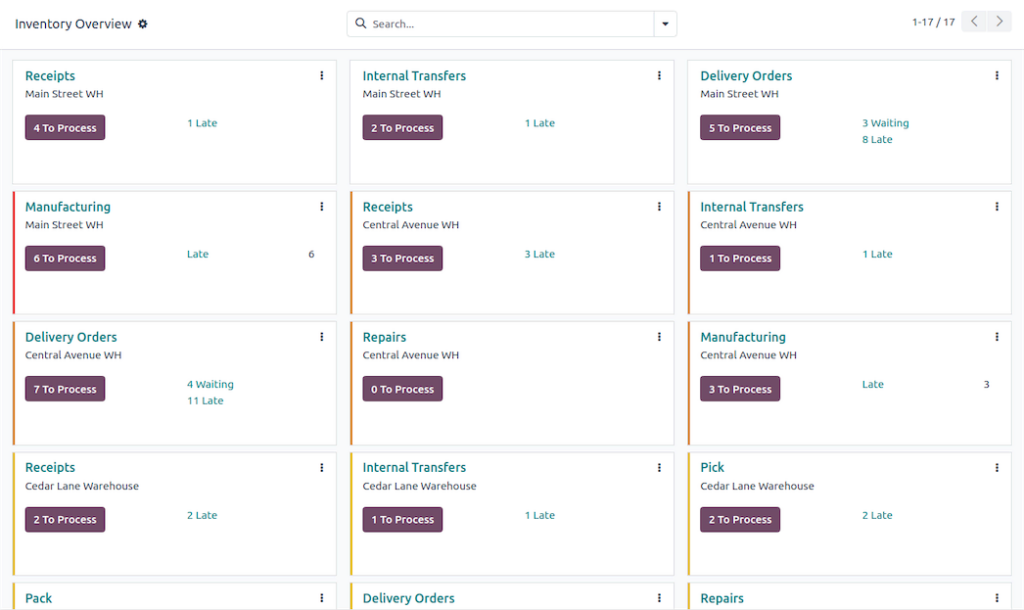
With Odoo inventory, stock movements can be connected to sales orders, purchase orders, manufacturing operations, delivery orders, and accounting impact. This helps companies control stock not only as a warehouse process, but as part of the full business operation.
How the Odoo Sales Module Connects to Inventory
The Odoo sales module helps businesses manage quotations, sales orders, customer information, pricing, products, order confirmation, and invoicing flow.
In a disconnected setup, sales teams often need to contact the warehouse before confirming an order. This may happen through WhatsApp, calls, or a shared sheet. If stock data is not updated, the sales team may promise delivery for unavailable items.
This creates customer dissatisfaction and internal pressure. With Odoo, sales and inventory can work together.
A typical workflow can look like this:
- A salesperson creates a quotation.
- Products are selected from the system.
- Stock availability can be checked.
- The customer approves the quotation.
- The quotation becomes a sales order.
- The system reserves or triggers delivery based on the configured workflow.
- Inventory movements are updated.
- The invoice can be generated from the order.
This connected flow reduces the need for manual coordination between sales and warehouse teams.
For management, it also creates better visibility into confirmed orders, stock commitments, delivery status, and expected revenue.
Sales Orders: The Starting Point of Operational Control
A sales order is more than a document sent to a customer. It is a trigger for several operational steps.
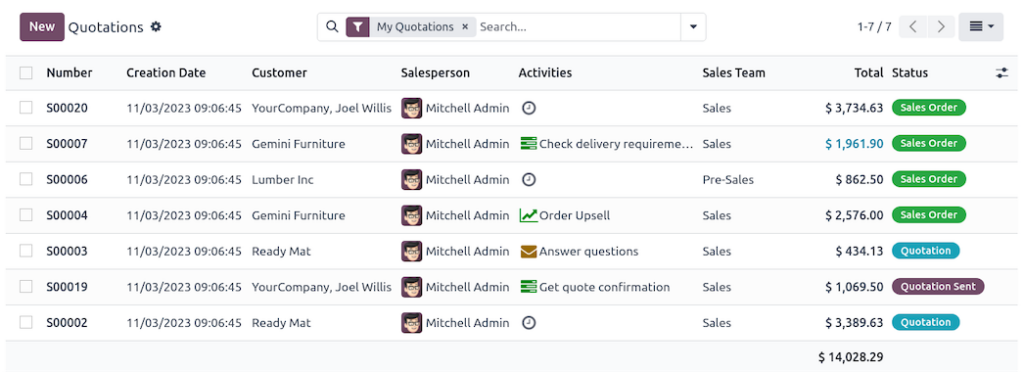
When a sales order is confirmed, it may affect:
- Product reservation
- Warehouse picking
- Delivery preparation
- Stock movement
- Customer invoice
- Revenue recognition
- Cash collection follow-up
- Sales reporting
- Inventory planning
If the sales order exists only in a spreadsheet or sales tool that does not connect to inventory and accounting, each next step needs manual communication. This creates delays.
In Odoo, the sales order can become the starting point for a connected workflow. Sales, inventory, and accounting teams can work from the same transaction instead of rebuilding the same information in different systems.
For trading and distribution companies, this can improve accuracy and reduce repeated work across departments.
Inventory Movements: Making Stock Visible and Traceable
Inventory is not static. Products move constantly.
They arrive from suppliers, move between warehouses, get reserved for orders, leave for delivery, return from customers, or move into manufacturing processes.
If these movements are recorded manually, the company may not know its real stock position.
This creates several risks:
- Overstocking slow-moving products
- Running out of high-demand items
- Losing visibility across warehouses
- Selling unavailable stock
- Delayed delivery
- Incorrect inventory valuation
- Weak purchasing decisions
Odoo inventory helps record and manage stock movements more systematically.
For businesses with multiple warehouses, branches, or product categories, this is especially important. The system can help teams understand where stock is, why it moved, and how it connects to sales and purchasing activity.
This gives the warehouse team better control and gives management better operational visibility.
Purchase Orders: Replenishment Based on Real Demand
Purchasing should not depend only on manual requests or guesswork.
In many companies, purchasing happens reactively. The warehouse notices that an item is low, sends a message, and the purchasing team starts checking suppliers. Sometimes the request comes too late. Sometimes stock is ordered unnecessarily because the actual quantity was not updated.
This creates stockouts, excess inventory, and cash flow pressure.
When Odoo inventory is connected to purchasing, replenishment can become more structured.
Purchase orders can be connected to:
- Product demand
- Stock levels
- Minimum stock rules
- Supplier information
- Expected receipts
- Inventory forecasts
- Pending sales orders
This helps purchasing teams make better decisions.
For trading companies, distribution businesses, manufacturers, and retailers, purchasing is directly connected to cash flow. Buying too much stock freezes cash. Buying too little stock loses sales.
Odoo helps companies manage purchasing as part of the same operational system, instead of treating it as a separate manual process.
Odoo Accounting: Connecting Transactions to Financial Impact
Odoo accounting becomes more powerful when it is connected to sales, inventory, and purchasing.
Accounting teams often struggle when operational data arrives late or incomplete. If sales orders, delivery notes, purchase orders, supplier bills, and stock movements are handled outside accounting, finance must manually collect and verify information.
This slows down reporting and increases error risk. With Odoo, accounting can be connected to the operational flow.
For example:
- Sales orders can lead to invoices.
- Customer invoices can connect to payments.
- Purchase orders can connect to vendor bills.
- Stock movements can affect inventory valuation.
- Expenses can connect to projects or departments.
- Reports can reflect operational data more quickly.
This gives finance teams a clearer connection between daily operations and financial records.
For business owners, this matters because accounting becomes less detached from reality. Financial reports are no longer built only from finance entries. They are connected to what actually happened in sales, warehouse, purchasing, and delivery.
Management Visibility: One View Across Operations
One of the biggest advantages of ERP is management visibility.
When sales, inventory, purchasing, and accounting are separate, managers receive fragmented reports. Sales reports may show revenue, inventory reports may show stock, and accounting reports may show financial results. But connecting the story requires manual analysis.
A manager may need to know:
- Which products are selling fastest?
- Which items are out of stock?
- Which sales orders are delayed?
- Which supplier orders are pending?
- How much cash is tied in inventory?
- Which customers have unpaid invoices?
- Which branches or warehouses are performing best?
- Are stock and accounting numbers aligned?
With integrated business software, management can see these relationships more clearly.
Odoo helps bring operational and financial data closer together, so decision-makers do not have to wait for manual reports from every department.
This supports faster decisions around purchasing, pricing, promotions, delivery planning, cash flow, and growth.
Why Odoo Is Useful for Trading Companies
Odoo can be especially useful as an ERP for trading companies because trading businesses depend heavily on the connection between sales, stock, purchasing, and accounting.
A trading company usually needs to manage:
- Product catalogs
- Customer quotations
- Sales orders
- Warehouse stock
- Supplier purchases
- Deliveries
- Customer invoices
- Vendor bills
- Payment follow-up
- Profit margins
- Inventory valuation
If these are handled in separate systems, the company spends too much time reconciling operations manually.
Odoo helps trading companies bring these areas into one operational system. Sales teams can work with product and customer data. Warehouse teams can manage stock movement. Purchasing teams can plan replenishment. Finance teams can connect invoices and bills to business activity.
The result is better control over daily operations and stronger visibility into profitability.
Why Odoo Fits Retail, Distribution, and Manufacturing
Although trading companies are a strong fit, Odoo is also useful for retail, distribution, and manufacturing businesses.
Retail
Retail companies need POS, stock movement, branch visibility, pricing, and accounting connection. If store sales do not update inventory and finance properly, reports become unreliable.
Distribution
Distribution companies need delivery tracking, stock availability, warehouse management, and supplier coordination. Sales teams need to know what can actually be delivered.
Manufacturing
Manufacturing companies need inventory, raw materials, production planning, purchase orders, quality control, and accounting visibility. Stock movements affect both production and cost.
In all these cases, the key issue is the same: operations are connected.
Odoo helps companies manage connected operations from one ERP platform instead of using separate tools for every department.
What Happens When These Systems Stay Disconnected?
Disconnected systems create hidden costs. The company may not notice them immediately because employees compensate through manual work. But over time, the cost becomes clear.
Common hidden costs include:
- Extra admin work
- Repeated data entry
- Delayed customer responses
- Stock mismatches
- Late invoices
- Slow reporting
- Poor purchasing decisions
- Weak cash flow visibility
- More dependency on specific employees
- Harder scaling
The bigger the business becomes, the more expensive these problems get. That is why companies should not wait until operations become chaotic before considering ERP.
If sales, inventory, purchasing, and accounting already depend on each other daily, it may be time to assess whether Odoo is the right next step.
What to Consider Before Implementing Odoo
Odoo implementation should start with business process mapping. Before selecting modules or configuring screens, the company should answer:
- How do sales orders currently move through the business?
- How is stock checked before confirming orders?
- How are purchase orders created?
- How are supplier bills matched?
- How are customer invoices generated?
- How are warehouse movements recorded?
- Which reports does management need?
- Which approvals should be automated?
- Which data needs to be cleaned before migration?
These questions help define the right implementation scope.
For many companies, the best approach is phased implementation. Start with the most important workflow, such as sales, inventory, purchasing, and accounting, then expand to CRM, HR, manufacturing, projects, eCommerce, or advanced reporting later.
This reduces complexity and improves user adoption.
Why PyramidBITS for Odoo Implementation
PyramidBITS helps Egyptian and MENA businesses implement Odoo around their real workflows, not generic templates. PyramidBITS is positioned as a digital transformation implementation partner that helps companies build integrated systems across ERP, CRM, HR, finance, automation, AI, and business operations.
For Odoo projects, PyramidBITS can help with:
- Business process assessment
- Module selection
- Sales workflow setup
- Inventory configuration
- Purchasing workflows
- Accounting integration
- User roles and permissions
- Data migration
- Management reporting
- Training and post-launch support
The goal is not only to activate Odoo modules. The goal is to create a connected operating system for the business.
For companies in Egypt, this local implementation approach matters because daily business workflows, approval habits, reporting needs, and user adoption challenges must be considered from the beginning.
FAQs About Odoo Inventory, Sales, and Accounting
What is Odoo inventory?
Odoo inventory is the inventory management module inside Odoo ERP. It helps companies manage stock levels, warehouses, transfers, receipts, deliveries, product movements, and replenishment workflows.
How does the Odoo sales module connect to inventory?
The Odoo sales module can connect quotations and sales orders to stock availability, reservations, delivery orders, and invoicing workflows. This helps sales and warehouse teams work from the same data.
What is Odoo accounting?
Odoo accounting is the finance and accounting module inside Odoo. It helps companies manage invoices, vendor bills, payments, bank reconciliation, financial reports, and accounting workflows.
Is Odoo good inventory management software?
Yes. Odoo can be a strong inventory management software option for companies that need inventory to connect with sales, purchasing, accounting, manufacturing, POS, or eCommerce.
Is Odoo suitable for trading companies?
Yes. Odoo can be suitable for trading companies because it connects sales orders, stock movements, purchase orders, supplier bills, customer invoices, and management reports in one ERP system.
Can Odoo connect sales, inventory, and accounting?
Yes. That is one of the main advantages of Odoo ERP. It helps companies connect daily operations so that sales, warehouse, purchasing, and finance teams work from shared business data.
Conclusion
Sales, inventory, purchasing, and accounting are not separate business functions. They affect each other every day. When these functions are managed through disconnected tools, the company spends too much time on manual updates, repeated data entry, stock checking, invoice matching, and report preparation.
Odoo inventory, the Odoo sales module, and Odoo accounting help companies connect these daily operations inside one ERP system. For trading companies, retailers, manufacturers, and distributors, this can improve control, reduce errors, and give management better visibility.
The real value of Odoo is not only the software modules. It is how these modules work together to reflect the way the business actually operates.
With the right implementation from PyramidBITS, Odoo can help your sales, inventory, and accounting teams work from one connected system.
Ready to Connect Sales, Inventory, and Accounting?
If your sales team, warehouse, purchasing team, and finance department are still working from separate tools, it may be time to move toward a connected ERP workflow.
PyramidBITS can help you assess your current process, choose the right Odoo setup, and implement the system around your daily operations.
Book a Free Odoo consultation
And see how your sales, inventory, and accounting can work together.