
Introduction
Zia scores leads, predicts deal closure, and flags anomalies based entirely on the data already in your CRM. If that data is full of duplicate records, stale fields, and inconsistent entries, Zia doesn’t know to distrust it — it simply produces confident, precise-looking outputs built on a foundation nobody’s checked in months.
The old version of this problem was a human working from bad data, who might notice something was off. The new version is an AI system acting on it automatically, at scale, before anyone reviews the decision.
That shift is exactly why data quality has quietly become one of the highest-leverage things a company can fix before leaning harder on AI-driven CRM features.
Why Bad Data Quietly Breaks Everything Downstream
This isn’t a hypothetical risk. A recent MarTech survey found that only 26% of respondents said more than three-quarters of their CRM data is accurate and complete, and 62% said poor CRM data probably or definitely cost their organization revenue — through missed renewals, inaccurate forecasts, lost deals, and misdirected campaigns. The same research flags exactly why this matters more now than it used to: AI agents can act on data errors automatically — sending a campaign, scoring a lead, reallocating budget — before a human ever reviews the decision.
Bad data used to mean a bad report someone might catch. Now it can mean a bad automated action nobody catches at all. It’s no coincidence that searches for data quality CRM fixes have been climbing alongside AI adoption inside sales tools generally.
What “Data Quality” Actually Means in a CRM
Data quality in a CRM context breaks down into three distinct problems, each requiring a different fix: duplicate records (the same contact or account entered multiple times, splitting activity history across records that should be one), incomplete records (missing fields that leave Zia and reports working from partial information), and stale records (data that was accurate once but never got updated as circumstances changed — a contact who left the company, a deal stage that stopped reflecting reality weeks ago). Treating all three as “one data quality problem” tends to produce a single generic fix that doesn’t actually solve any of them well.
Consider a lead that gets created twice — once from a webform submission, once from a manual entry after a phone call the rep didn’t realize was already logged. Activity history now splits across two records: half the email opens attached to one, half the call notes attached to the other. Zia scoring either record individually undercounts genuine engagement, because it’s only ever seeing half the real picture.

3 Critical Fixes to Protect Zia Accuracy
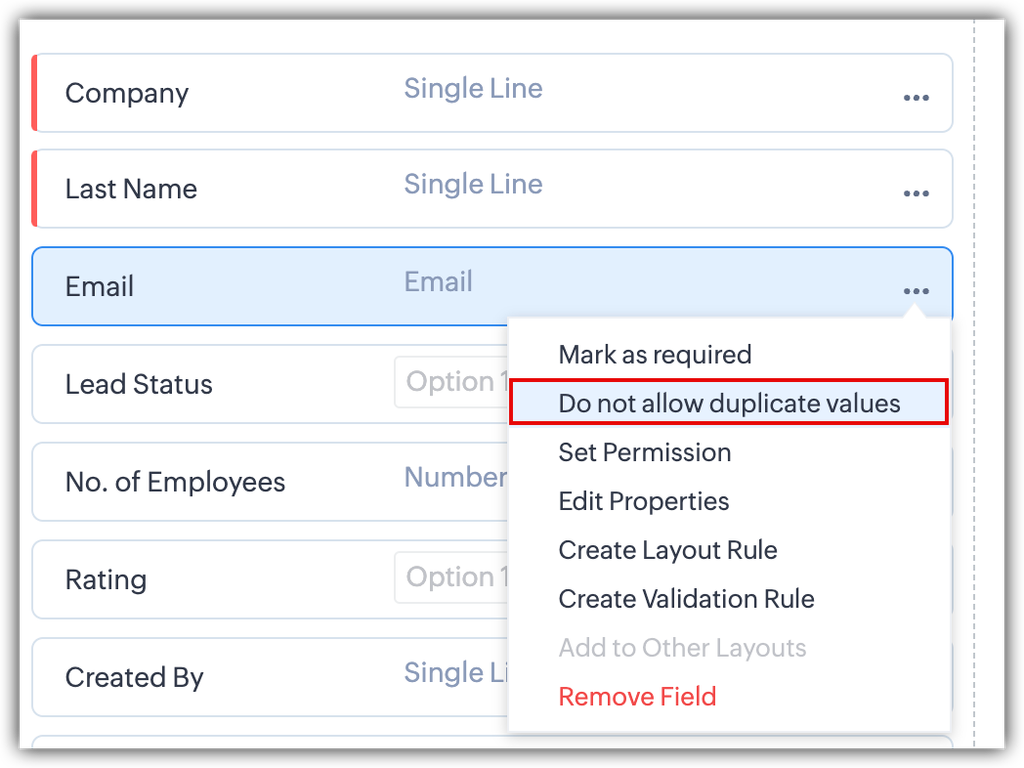
1. Prevent duplicates at the point of entry, not just after the fact. Marking key fields — email address, a specific ID — as “unique” in Zoho CRM stops duplicate records from being created in the first place, rather than relying on a periodic cleanup to catch them after they’ve already fragmented a contact’s history across multiple records.
2. Run a genuine deduplication sweep on a schedule, not “eventually.” Existing duplicates don’t fix themselves. A regular, scheduled merge pass — not a one-time cleanup project — keeps historical duplicates from quietly accumulating again between efforts.
3. Enforce required fields at the stages where completeness actually matters. Rather than hoping reps fill in every field voluntarily, Blueprint-enforced required fields at specific pipeline stages ensure the data Zia and your reports depend on most is actually there when it matters, not optional.
How Zoho CRM’s Deduplication Tools Actually Work
Here’s the accurate technical picture: Zoho CRM lets you mark specific fields as “unique” — email address is the most common choice — which triggers a duplication alert the moment someone tries to create a record with a matching value. For duplicates that already exist, the Find & Merge Duplicates tool identifies and merges matching records, either automatically for exact matches or with manual conflict resolution when field values differ between records.
Worth knowing before assuming full coverage: records created through API integrations or third-party tools often skip the duplicate checks that apply to manual entry — meaning a lead sync from a marketing platform or e-commerce integration can quietly create duplicates that a rep typing a new contact by hand never would have. This is exactly why a scheduled deduplication sweep matters even with unique fields configured — prevention and cleanup are both necessary, not one or the other. It’s also worth confirming your plan tier: enhanced duplicate-check functionality is available on Enterprise and Ultimate editions specifically, not the entry-level tiers, which matters if you’re budgeting for this capability assuming it’s included everywhere.
The Implementation Angle
Fixing data quality isn’t a one-time cleanup project — it’s an ongoing discipline that needs to be built into how the CRM actually operates. This approach includes:
- Configuring unique fields and duplicate prevention around your actual data structure, not a generic default that misses your specific duplication risks.
- Auditing integration points specifically, since API-created duplicates are the gap most teams don’t know they have until it’s pointed out directly.
- Building required-field enforcement into Blueprints at the pipeline stages where completeness genuinely matters most, tied to the same enforcement logic behind Zoho CRM Blueprints generally.
- Connecting data quality to Zia’s actual accuracy over time, since Zia’s scoring and predictions genuinely improve as the underlying data does — this is the same discipline covered in our piece on why growing sales teams outgrow spreadsheets, applied here specifically to data that’s already inside the CRM rather than still living outside it.
Practical Next Steps
Before assuming your data quality is fine, these steps reveal the actual state of things — and none of them require any new software, just an honest look at what’s already there:
- Run Zoho CRM’s Find & Merge Duplicates tool on your Contacts and Accounts modules and count how many duplicates surface. This number alone is usually a wake-up call.
- Check which of your lead sources come in through an integration (marketing automation, e-commerce, web forms via API) versus manual entry, since integration-sourced records are where duplicate checks most often get skipped.
- Pick five records at random from each core module and check for missing fields Zia or your reports would actually depend on.
- Ask when the last scheduled deduplication pass happened. If the honest answer is “never” or “once, a while ago,” that’s the gap to close first.
FAQs
What does data quality mean in a CRM context?
Anyone researching data quality CRM fixes usually finds the topic covers three main dimensions: duplicate records (the same contact entered multiple times), incomplete records (missing key fields), and stale records (data that was once accurate but never got updated). Each requires a different fix, not one generic cleanup. Our complete Zoho CRM implementation guide covers how data quality gets addressed as part of a full rollout, not just as an afterthought.
Does Zoho CRM prevent duplicate records automatically?
It can, when configured — marking a field like email address as “unique” triggers a duplication alert at the point of manual entry. However, records created through API integrations often bypass this check, which is why crm data deduplication as an ongoing scheduled task still matters even with unique fields set up.
How does poor data quality specifically affect Zia AI’s accuracy?
Zia’s lead scoring, deal prediction, and anomaly detection all learn from and act on data already in the CRM. Duplicate, incomplete, or stale records give Zia a distorted picture to work from, producing confident-looking outputs built on unreliable inputs.
Is Zoho CRM’s deduplication feature available on every plan?
Enhanced duplicate-check functionality is available on Enterprise and Ultimate editions specifically. Basic unique-field duplicate prevention is more broadly available, but it’s worth confirming exactly what your current tier includes before assuming full coverage.
How often should a CRM data quality audit happen?
A scheduled deduplication and completeness check — monthly or quarterly depending on data volume and how many records come in through integrations — is far more effective than a one-time cleanup that lets duplicates and gaps quietly accumulate again afterward.
Book a Free CRM Consultation
If you’re not sure how clean your CRM data actually is, that’s worth finding out before trusting Zia’s outputs at face value — the audit itself usually takes far less time than people expect.
Book a free Zoho CRM consultation with PyramidBITS and get a real read on what’s feeding your AI-driven decisions.