Someone builds the segments. VIP customers, at-risk accounts, high-potential leads — a genuinely useful breakdown of the customer base. It gets presented in a meeting, everyone nods, and then… nothing happens. No campaign gets built around the VIP segment. No re-engagement sequence targets the at-risk one. The segmentation was real work, correctly done, and it becomes a static report that ages in a dashboard instead of driving a single actual customer touchpoint.
This gap between analysis and action is where most customer segmentation software investments quietly fail to pay off, and it rarely gets diagnosed correctly because the segmentation itself usually looks perfectly fine in isolation.
Why Segmentation Becomes a Report Nobody Acts On
This happens for a structural reason, not a lack of effort: segmentation and campaign execution often live in different tools, owned by different people, on different timelines. Marketing builds the segment as an analysis exercise.
Turning that segment into an actual email sequence, ad audience, or outreach list is a separate task that requires someone to remember to do it, manually export the list, and build the campaign around it — and “remember to do it later” is exactly the kind of step that quietly falls off a busy team’s list, week after week, until the segment is simply forgotten entirely.
What Segmentation That Drives Campaigns Actually Looks Like
The fix isn’t better segmentation analysis — most teams are already reasonably good at defining who their VIP or at-risk customers are. The fix is closing the gap between defining a segment and acting on it: good customer segmentation software keeps a segment updating automatically as customer behavior changes, connected directly to the tool that actually sends campaigns, so identifying a segment and activating a campaign around it become the same motion instead of two separate projects with a gap in between.
Zoho’s own customer segmentation documentation describes this connection explicitly — segmentation exists to let you “plan your engagement with each group,” not just describe the group.
5 Signs Your Segmentation Is Just Reporting
1. Segments live in a spreadsheet or a one-time export, not inside the system that actually sends campaigns.
2. Nobody can say when a segment was last updated, which means it’s a snapshot from whenever someone happened to run the analysis, not a living, current picture.
3. No campaign has ever been built specifically for a defined segment — segments exist, but campaigns still go out to broader, less targeted lists.
4. Reviewing segments is a quarterly or occasional exercise, not something checked regularly enough to actually inform week-to-week marketing decisions.
5. The people who define segments and the people who build campaigns rarely talk, meaning even a well-built segment often never reaches whoever could act on it.
If two or more of these sound familiar, the segmentation work itself is probably fine — the problem is entirely in what happens (or doesn’t) after it’s built.
How Zoho CRM Turns Segments Into Actual Campaigns
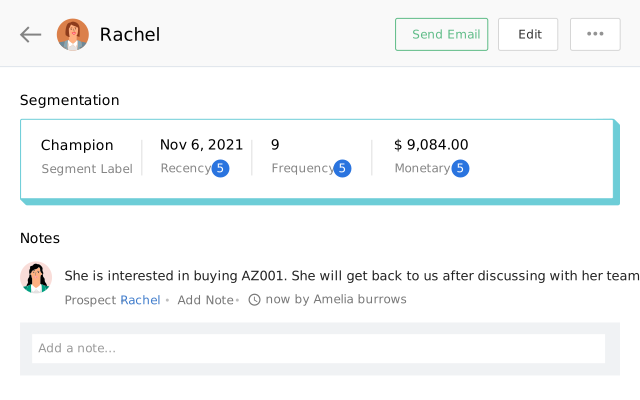
Zoho CRM’s Segmentation feature applies RFM analysis (recency, frequency, monetary value) automatically, scoring and labeling accounts — Champion, About to Sleep, and similar categories — with scores refreshing roughly every 24 hours, so segments stay current rather than becoming a stale one-time snapshot.
The part that actually closes the reporting gap is connection: segments built in Zoho CRM can feed directly into Zoho Campaigns or Marketing Automation for targeted sends, meaning a defined segment becomes a campaign audience without a manual export step in between. Research on what this kind of targeting actually delivers is well documented — Mailchimp’s own analysis of over 11,000 segmented campaigns, sent to nearly nine million recipients, found segmented campaigns achieve roughly 14.3% higher open rates and about 101% higher click-through rates than non-segmented sends.
That gap compounds meaningfully across a full year of campaigns, which is exactly the value a report-only segmentation exercise never captures. For businesses wanting deeper technique-specific guidance — RFM, predictive, and persona-based methods in more depth — our guide to advanced segmentation strategies covers the underlying methods.
Practical Next Steps
Before rebuilding your customer segmentation software approach, these steps show you exactly how much of your current work is going to waste, and take less than a day to work through as a team:
- List every segment currently defined and check the date it was last actually used to build a campaign, not just reviewed in a meeting.
- Ask whoever builds campaigns whether they’ve ever received a segment directly from whoever does the analysis, or whether campaigns always go to broader lists instead.
- Check how segments currently get from analysis to activation. If the honest answer involves a manual export, that’s your gap.
- Pick one high-value segment — VIP customers or at-risk accounts are usually the clearest starting points — and build one actual campaign around it this month as a test case.
FAQs
What is customer segmentation software?
Customer segmentation software groups customers into meaningful categories — based on behavior, value, purchase patterns, or other criteria — so marketing and sales can target each group with relevant messaging instead of treating the entire customer base identically. The distinction that matters most is whether that software connects directly to campaign execution, or only produces an analysis that has to be manually acted on elsewhere.
Why does segmentation often fail to actually improve marketing results?
Most commonly because segments are built as a one-time analysis exercise disconnected from the tools that actually send campaigns — the insight exists, but nothing acts on it, so it never translates into different customer-facing behavior.
Does Zoho CRM support RFM segmentation?
Yes, natively. Zoho CRM’s Segmentation feature scores accounts on recency, frequency, and monetary value, applying labels like Champion or About to Sleep automatically, with scores refreshing on a regular cycle rather than requiring manual recalculation.
Can Zoho CRM segments be used directly for email campaigns?
Yes, when connected to Zoho Campaigns or Marketing Automation, segments defined in the CRM can feed directly into targeted campaign sends, closing the manual-export gap that often stalls segmentation work before it reaches an actual customer.
How often should customer segments be reviewed and updated?
With automated RFM scoring, segments can update as frequently as daily. Even without full automation, a monthly review cycle is far more useful than the quarterly-or-never pattern most teams default to, since customer behavior — especially recency and engagement — shifts faster than an occasional review captures.
Is there a risk of over-segmenting and making campaigns too narrow to be worthwhile?
Yes — this is a real failure mode in the opposite direction. A segment too small or too narrowly defined to reach meaningful volume isn’t worth building a dedicated campaign around. Most teams get more value starting with three to five broad, clearly distinct segments and refining from there than attempting granular segmentation before the basics are actually being acted on.
Book a Free Zoho CRM Consultation
If your segments are accurate but nothing’s actually been built around them recently, that’s a connection problem, not an analysis problem — and it’s usually a faster fix than rebuilding the segmentation work from scratch.
Book a free Zoho CRM consultation with PyramidBITS and see how segmentation can turn into live campaigns automatically instead of sitting in a report.