Introduction
Every sales team has a process. The question is whether it lives inside the CRM, or only inside a manager’s head. When it’s the second one, reps skip steps nobody’s enforcing, deals reach “Closed Won” with half the required fields blank, and “did anyone actually qualify this lead?” becomes a recurring, unanswerable question.
Zoho Blueprints exist to solve exactly this — turning “we usually do this” into “the system won’t let you skip this.” The shift sounds small in a sentence, but it’s the difference between a process everyone claims to follow and one the CRM actually guarantees.
The Problem With a Process That Only Exists in Someone’s Head
Most sales teams believe they have a defined process. In practice, what they have is a shared understanding that erodes the moment a new rep joins, a manager gets busy, or a deal moves fast enough that “we’ll fix the paperwork later” becomes the norm. Without enforcement, three things happen predictably:
Steps get skipped under pressure. A rep rushing to close a deal before month-end will happily skip a discovery step nobody’s actually checking for.
New hires learn the informal version. Without a system enforcing the real process, new reps learn whatever their onboarding buddy happens to do, which may or may not match what management actually wants.
Nobody notices until it’s a pattern. A single skipped step looks like an exception. A hundred skipped steps across a quarter is a systemic problem that’s much harder to see from inside it.
What Are Zoho Blueprints?
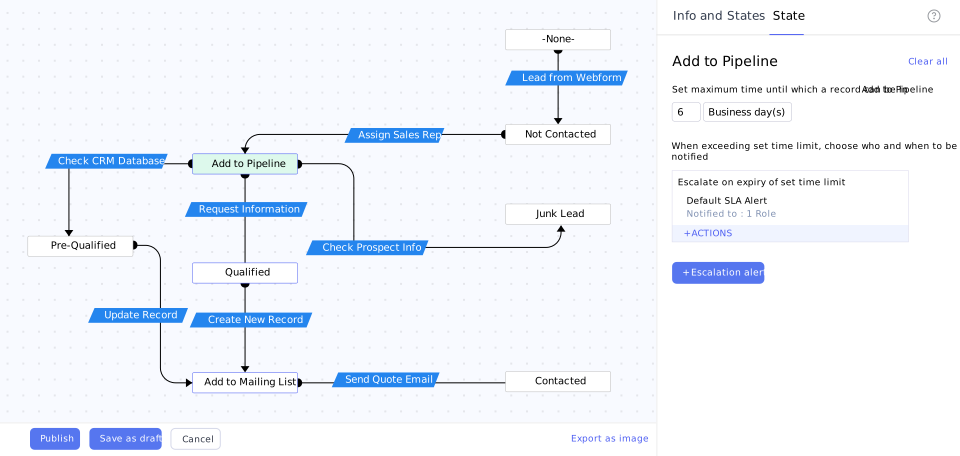
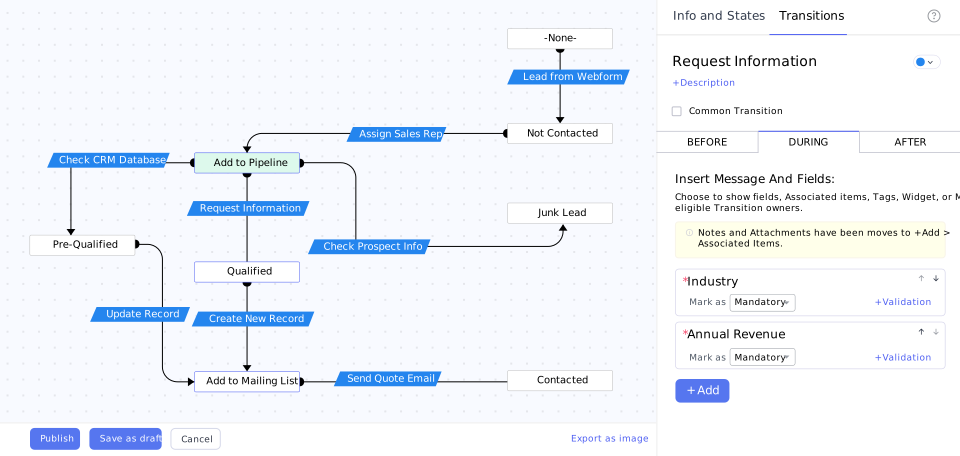
A Zoho Blueprint is a visual, no-code representation of your actual sales (or any business) process, built directly into Zoho CRM. It’s typically attached to the Stage field on Deals: each stage becomes a “state,” and the allowed move from one stage to the next becomes a “transition.”
Once built, Zoho Blueprints don’t just track where a deal is — they control how it got there, requiring specific fields, tasks, or approvals to be completed before a rep is even allowed to advance a record to the next stage.
4 Steps to Turn Your Sales Process Into a Zoho CRM Blueprint
Map your real process, not the idealized version
Document what your sales cycle actually looks like today, including the messy parts — not the version that would look good in a slide deck. A Blueprint built on an idealized process creates dead ends where reps hit a wall because reality doesn’t match what was designed.
Turn each real stage into a state
Every value in your Stage picklist becomes a state in the Blueprint. Keep the first version linear rather than heavily branched — an overcomplicated Blueprint with too many paths becomes a maze nobody follows, which defeats the purpose entirely.
Define what must happen at each transition
For each move from one stage to the next, decide what’s actually required: a specific field filled in, a task completed, a document uploaded, a manager’s approval. This is where “we usually do this” becomes “the system requires this.”
Add common exit transitions
Every Blueprint needs a way out from any state — typically “Closed Lost,” so a deal can be marked dead from wherever it currently sits, not just from a predefined end point.
For the full technical build — screenshots, field configuration, and edge cases — our Ultimate Guide to Zoho CRM Blueprints walks through the actual construction process in the CRM interface step by step. This post is the “why it matters and what to plan before you start” companion to that guide.
Blueprints vs Workflow Rules — What’s the Difference?
These two get confused constantly, and picking the wrong one wastes setup time. Zoho’s own Blueprint documentation frames it clearly: workflow rules automate behind-the-scenes actions — sending an email, assigning a task — without any human needing to do anything differently.
Blueprints, by contrast, actively guide a human through a process, requiring specific actions before they’re allowed to move forward. If you want something to happen automatically in the background, that’s a workflow rule. If you want to stop a rep from skipping a step, that’s a Blueprint. Most well-configured Zoho CRM setups use both — Zoho’s process management page covers how the two work together rather than as competing tools.
The PyramidBITS Implementation Angle
A Blueprint copied from a generic template rarely survives contact with a real sales team — it either blocks reps from doing something the business actually allows, or it’s too loose to enforce anything meaningful. PyramidBITS’s approach to Blueprint implementation includes:
- Mapping the real process first, including the exceptions and edge cases most teams forget to document until a rep hits a wall.
- Designing transitions around what genuinely needs enforcement, not everything that theoretically could be — an overly restrictive Blueprint gets abandoned as fast as no Blueprint at all. This same discipline is what prevents the pattern we cover in why growing sales teams outgrow spreadsheets in the first place.
- Testing with the actual sales team before rollout, since a Blueprint that looks correct on paper often reveals gaps the moment a real rep tries to use it.
- Connecting Blueprint enforcement to the broader sales process, including the causes behind why B2B deals stall that a well-designed Blueprint can catch before they become a pattern. Our broader guide to powering up your sales process with Zoho CRM covers how Blueprints fit into the wider automation picture.
None of this happens through the software alone — it happens through the process mapping conversation that comes before any Blueprint gets built.
Practical Next Steps
Before opening the Blueprint builder, these steps will save real rework later:
- Write down your actual current process, stage by stage, including what really happens when a deal moves fast or a step gets skipped under pressure.
- Identify which steps are genuinely non-negotiable versus which are just “usually how we do it” — Blueprints work best when they enforce the former, not every possible preference.
- List the fields, tasks, or approvals that should be required at each stage transition, specifically enough that someone else could build the Blueprint from your notes.
- Decide who tests the Blueprint before full rollout — a Blueprint tested only by the person who designed it will miss the edge cases real reps hit immediately.
FAQs
What are Zoho Blueprints?
Zoho Blueprints are a no-code feature that turns a business process — most commonly a sales pipeline — into an enforced sequence of stages and required actions inside Zoho CRM, so reps can’t skip steps or advance a record without meeting defined criteria.
What’s the difference between a Zoho Blueprint and a workflow rule?
A workflow rule automates background actions (sending an email, updating a field) without requiring a human to act differently. A Blueprint actively controls what a person can do next, requiring specific fields, tasks, or approvals before a record can move to the next stage.
Do I need to know how to code to build a Zoho Blueprint?
No. Blueprints are built through a drag-and-drop visual canvas. Coding only becomes relevant if you want a transition to trigger a custom function, which most teams never need for a standard sales process.
Is Zoho Blueprints available on every Zoho CRM plan?
Blueprint is a Professional-tier-and-above feature — it isn’t included in the entry-level Standard plan. The number of Blueprints and transitions you can build generally increases at higher tiers.
How long does it take to design and roll out a Zoho Blueprint?
The technical build itself is usually fast once the process is mapped clearly. The part that actually takes time — and determines whether the Blueprint gets adopted — is accurately documenting the real process and testing it with the sales team before full rollout.
Can a Zoho Blueprint be changed after it’s live, or is it locked in once built?
Blueprints can be edited after launch, though changing an active Blueprint affects records currently mid-process, so changes are usually best made deliberately rather than frequently. Most teams treat the first version as a working draft, refine it after a few weeks of real use, then keep it stable rather than adjusting it constantly.
Book a Free Zoho CRM Demo
If your sales process currently lives mostly in one manager’s head, that’s a real business risk, not just an inconvenience.
Book a free Zoho CRM demo with PyramidBITS and see what a properly designed Blueprint would look like for your actual sales cycle.